
The AI replies from the creator's own account, on OnlyFans or on Telegram, and its job is to turn a chat into a paid unlock. It does that by running the same loop with every fan: it learns who the fan is, warms the conversation up, starts one of your scripts, sends the media step by step, defends the price, and comes back when the fan goes quiet. Every tab of the creator workspace controls one moment of that loop. This page maps the loop to the tabs, so that when you change a setting you know exactly which moment you are changing.
Where it happens
You never watch the loop from a special screen. It happens inside the fan's normal conversation, and you read it back from the Fans tab. Open a creator, click Fans, then click a row: the conversation lists every message with "Creator" or "Fan", the time, and a "sent by" marker with a robot icon on the messages the AI wrote. Paid media show "Price: N $".
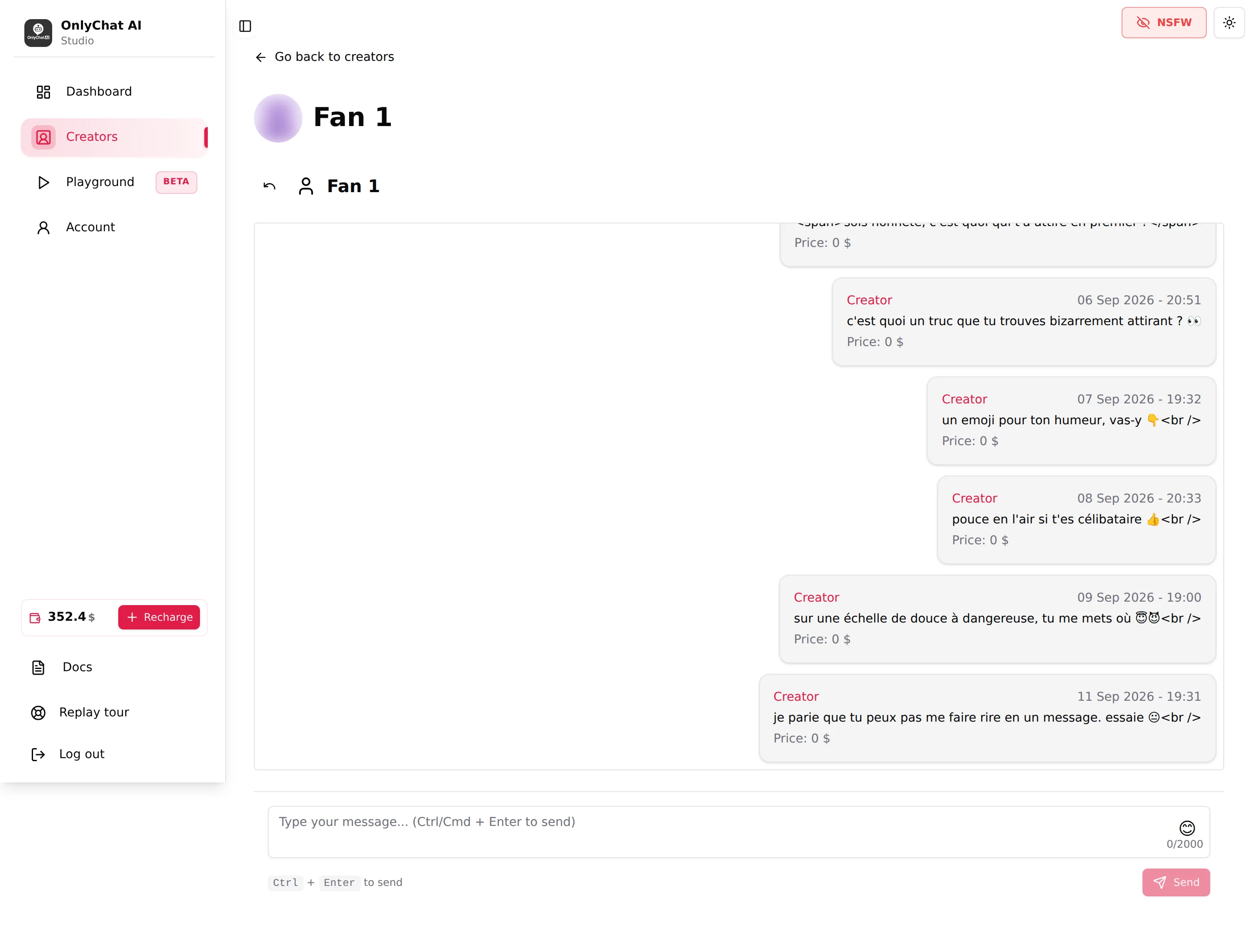
Step 0: who the AI is allowed to talk to
Before any reply, three gates are checked.
| Gate | Where | What it does |
|---|---|---|
| AI switch on the creator | Creators board card, or the header of the workspace | Master switch. Off means no automatic reply at all for this creator. See Enable the AI. |
| Enable AI switch on the fan | Fans tab, one switch per row | Pauses the AI for one fan only. See Enable AI per fan. |
| Fan lists onlyfans | Fan Lists tab | "The AI replies only to fans in at least one Active list and in no Excluded list, exclusion always wins." See Fan lists. |
On OnlyFans a fourth gate exists if you use the Schedules tab: inside a timeslot the AI switches itself on, outside it switches off.
Step 1: discovery (KYC)
The first thing the AI does with a new fan is learn who he is. The KYC strategy in Settings, Strategies is described in the interface as "What the AI learns about a fan, and how." Its default target list is:
- First name
- Age
- City/Location
- Occupation
- Relationship status (single, in a relationship, married)
- Passions/Hobbies
The AI asks for these naturally, over several messages, not as a form. What it learns is kept with the fan and reused later: it is what lets the AI say "how was the night shift?" instead of a generic line. You can change the targets and the way the AI asks in Custom strategies.
Step 2: warming up
Between discovery and the first script, the AI keeps the conversation going in the creator's voice. Three groups of settings decide what that voice sounds like:
- Details (identity, appearance, languages, hobbies, personality traits): the facts the AI answers with when a fan asks "where are you from" or "how tall are you". See Identity and appearance.
- Additional info: the free text the AI "reads verbatim", the daily routine, the boundaries, the running jokes. See Additional info.
- Language strategy: "How the AI writes: vocabulary, punctuation, slang." Casual, Formal or Custom. See Language and negotiation style.
Pace settings apply from the very first message: Response Delay (minutes) is "How fast the bot responds after the fan sends a message", and Split long AI messages into multiple bubbles turns one long reply into several short ones. See Behavior and timing.
Step 3: launching a script
A script is a scene with steps: a message, media, a price. The AI does not send scripts on a timer. It waits for the conditions defined by the Launch script strategy, "The conditions to meet before a script can start." Two built-in styles exist, Normal and Aggressive, plus Custom.
Which script starts:
- The script flagged with the star on the Scripts tab ("This script will be used first") goes first for a new fan.
- Only scripts whose Active switch is on can be used ("Script is active and will be used by the bot").
- A script the fan has already seen is not resent. The Fans tab shows "Scripts used" as "x / y" per fan, and the counter turns red when the fan has seen every active script. At that point the AI has nothing left to sell to him until you add or activate a script.
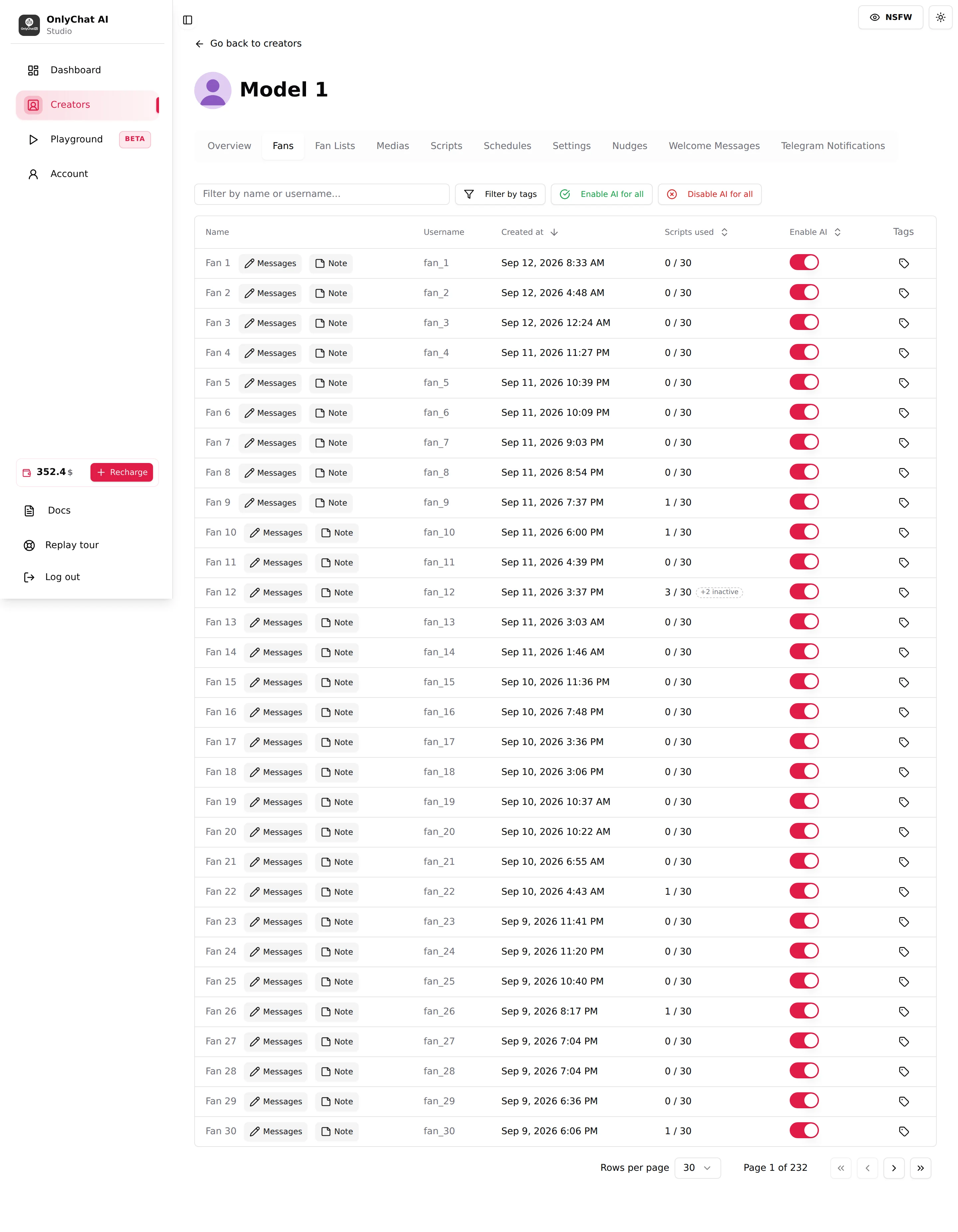
Step 4: walking the steps and sending media
Inside a script the AI follows your steps in order. Each step has a Message (sent as you wrote it: the tone settings do not rewrite this line, only translation applies), Medias, a Price (0 means the media is sent free), an optional discount, and a pacing choice, Approx. Messages Between This Step And The Next One (Few, Normal or Many). The AI fills the gap between two steps with conversation, in the creator's voice, and moves to the next step when the pacing says so.
The Sexualisation strategy, "How explicit the AI is once a script is running", decides how far that conversation goes while a script is active. Default is tuned on real conversations; Custom replaces it.
Step 5: negotiation
When a fan says "too expensive" or asks for a free preview, the Negotiation strategy takes over: "How the AI defends its prices." The AI can only fall back to the Discounted Price you set on the step when Enable discount is on. It never invents a lower price. If no discount exists on the step, the AI holds the price.
Step 6: follow-ups
Fans go quiet mid-script all the time. Two settings decide what happens next:
- Follow-Up Delay (minutes): "Time the bot waits before sending a follow-up message if the fan hasn't replied." Range 2 to 30, default 8.
- Follow-up strategy: "How the AI comes back when a fan goes quiet." Default or Custom.
Per step, Post-Media Messages are extra messages sent after the main media, each with its own delay, and Skip media followup if paid (send next step) jumps straight to the next step when the fan paid but did not answer.
On Telegram, longer silences are handled by the Re-engagements tab, with a timeline of checkpoints. See Re-engagements. On OnlyFans with a Premium license, Nudges re-engage fans when they come back online.
Step 7: script end and cooldowns
A script ends when the last step is done, when the fan bought everything, or when the Script inactivity timeout (hours) of that script elapses ("After this delay without interaction, the bot exits the script.", default 1.5 hours). Then the Strict Script Cooldown (hours) starts: "Time during which no new script can start after one ends, even if the fan tries to initiate." Default 10 hours. During that window the AI keeps chatting, without pushing. When it expires, the loop goes back to step 3 with the next unseen script.
The other slider of the Cooldowns card, Minimum Sexualization Cooldown (days) (default 2), is the long brake between scenes: after a script ends, the AI does not steer that fan back toward sex or a scene by itself for that many days unless the fan initiates, and the counter restarts at the end of every script. See Cooldowns.
When a fan has seen every script (No Script Left): how long the AI keeps chatting
Once a fan has been through every active script of the creator, the AI has nothing left to sell him. It keeps chatting with him, in character, without pushing any content, for a limited time, then stops answering him until you activate a new script or a variation. If he asks for something sexual during that window, the AI turns him down, because there is no content left to send. How long the AI keeps chatting depends on the platform and the license:
| Platform and license | The AI keeps chatting for |
|---|---|
| OnlyFans, Basic license | 24 hours |
| OnlyFans, Premium license | 5 days |
| Telegram | 24 hours |
The fan shows as "x / x" in red in the Scripts used column of the Fans tab, and the No Script Left alert warns you the moment it happens, see Fans list and Telegram alerts. The fix is always the same: add a script or a variation, see Versions and variations.
What you measure
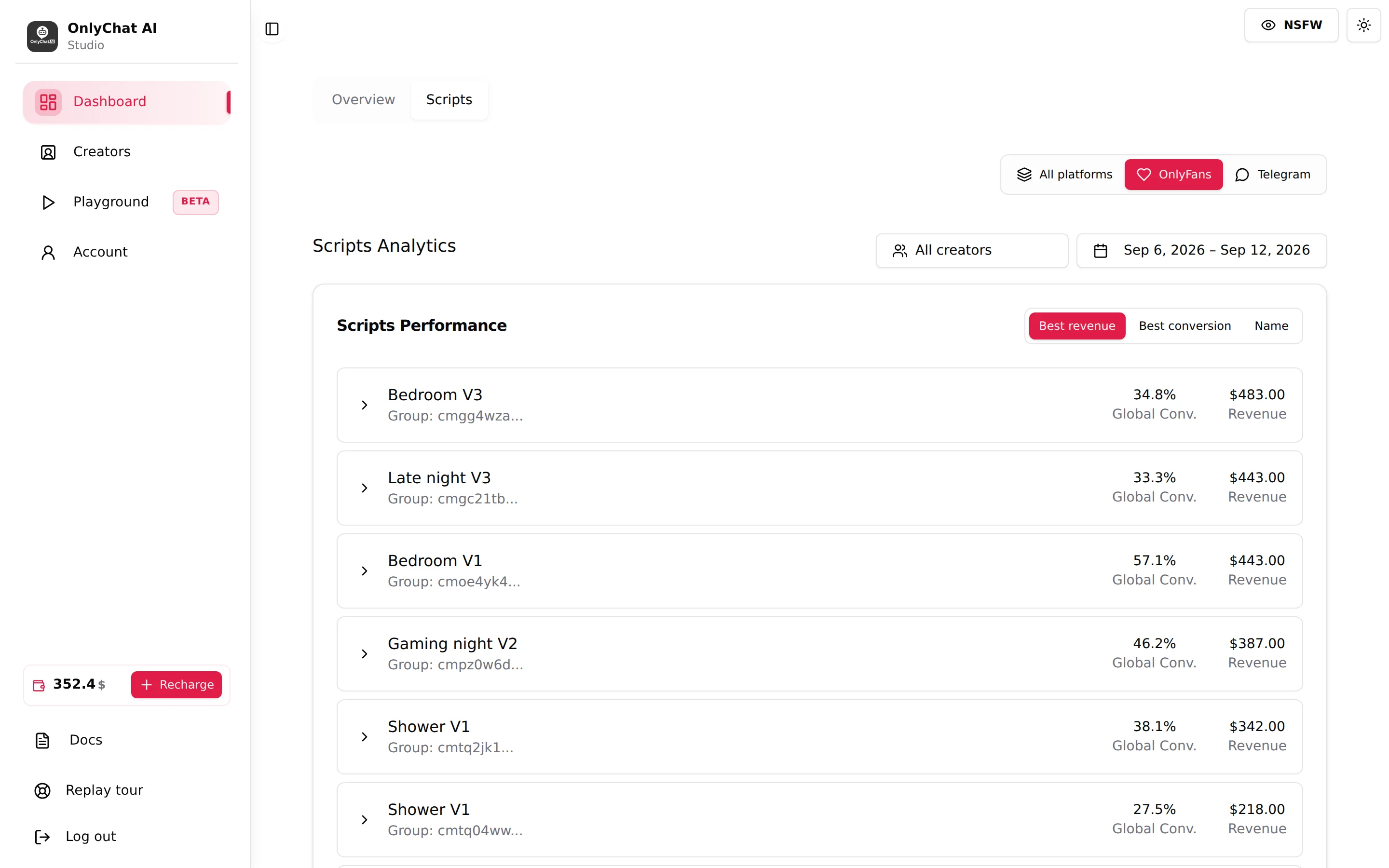
The dashboard tells you which part of the loop works. Unlock Rate is the "Percentage of paid media content that has been unlocked by fans". The Scripts tab of the dashboard ranks scripts by Best revenue or Best conversion, and each row expands to a Steps Detail with Sent, Paid, Conv. and Rev. per step. A step where many fans stop is the step to rewrite.
What the AI never does
- It never replies when the creator's AI switch is off, when the fan's own switch is off, or, on OnlyFans, when the fan is not in an Active list or sits in an Excluded list.
- It never starts a script while a strict script cooldown is running, and never restarts a script the fan already went through.
- It never sells a media outside a script step, whatever the fan asks for: paid content only leaves through the steps you built (the only media sent outside a script are the free ones you attach to Premium welcome messages). It never sends a media that is not synced (OnlyFans) or uploaded (Telegram) on the Medias tab, and never sells below the discounted price you set.
- It never rewrites the Message of a step. What you wrote is what the fan reads, translated if needed.
- It never reads your fan tags. "Tags are yours, the AI doesn't read them."
- It bills commission only on what it sells: 10% of AI net revenue on OnlyFans, 15% on Telegram. On OnlyFans, a PPV sent by a human while the AI is running the conversation, or within 30 minutes after the AI is switched off on that fan, still counts as an AI sale (anti-fraud rule); on Telegram a PPV sent by hand still goes out through the bot, so it is commissioned too, at 15% (an AI sale, or sent while the AI is chatting the fan or within 30 minutes of switching it off) or a reduced 4% (sent by hand on a fan whose AI is off), see Plans and commission.