
Cooldowns are the brakes. Without them the AI would finish a script and start the next one in the same breath, and a fan who just paid $16 would be pitched again ten minutes later. The Cooldowns card of the Behavior sub-tab holds the two creator-wide brakes; each script adds two of its own in the script editor. The interface describes the card as "How long the AI waits before pushing again after a script or a sexual exchange."
Where to find it
Open the creator, click Settings, then Behavior. The Cooldowns card is the second card, under Pace. Save with Submit. The two per-script timers live on the script editor page (Scripts tab, Add Script or Edit).
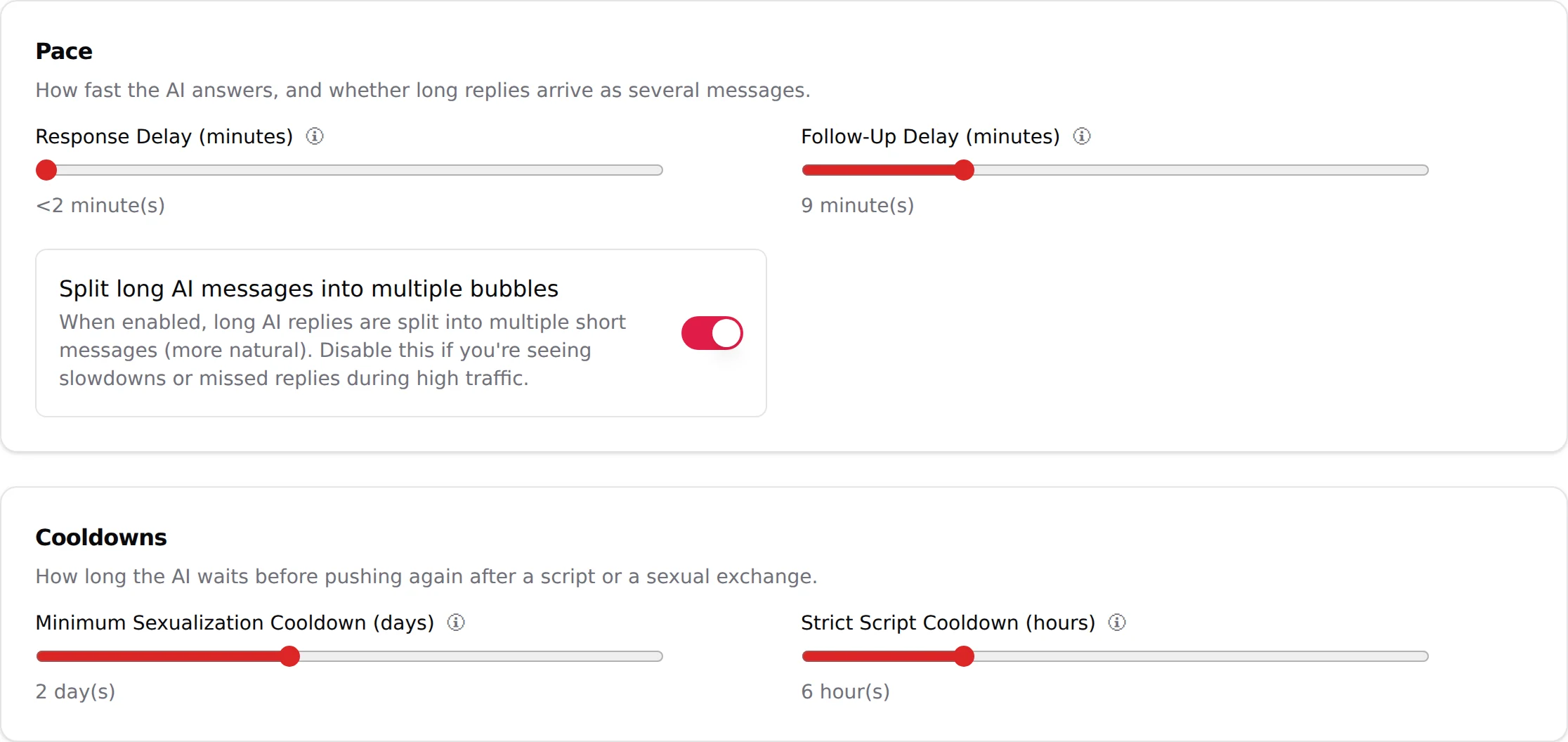

Minimum Sexualization Cooldown (days)
Helper text: "Time the bot must wait after a script ends before it can attempt to sexualize the conversation again (unless the fan initiates)."
The helper text says it all: this counter starts again every time a script ends for a fan, and it runs per fan. It is the long brake between two scenes; the Strict Script Cooldown below is the short, hard one.
| Control | Slider |
| Range | 0 to 5 days |
| Default | 2 |
| Display | "N day(s)" |
What it changes: after a script ends for a fan (bought out, exhausted or timed out), the AI stays friendly and non-sexual on its own initiative with that fan for N days: it answers, keeps the conversation alive, builds the relationship, but does not steer back toward sex or a paid scene by itself. The exception is in the helper text: "unless the fan initiates". A fan who comes back horny is answered in kind and can go through the next script, subject only to the Strict Script Cooldown below. A brand-new subscriber has no finished script yet, so this timer is not running for him: nothing here delays a first script on day one.
The counter restarts at the end of every script. With the default of 2 days, a fan who finished a scene on Monday evening is not pitched again by the AI before Wednesday evening, unless he asks first.
Recommended: 2 (the default) for a persona sold as a girlfriend experience, where two days of rapport separate one scene from the next; 1 for a high-volume, explicit persona whose fans expect a new scene right away; 0 only for testing. At 5 the AI will look cold to a fan who is used to buying every couple of days.
Pitfall: this cooldown only holds back the AI's own initiative. It does not stop a fan from buying when he asks, and it does not silence anyone. The hard block that applies even when the fan asks is the next slider.
Strict Script Cooldown (hours)
Helper text: "Time during which no new script can start after one ends, even if the fan tries to initiate."
| Control | Slider |
| Range | 0 to 24 hours |
| Default | 10 |
| Display | "N hour(s)" |
What it changes: a hard window after a script ends during which the AI will not start another script for that fan, whatever the fan says. "Even if the fan tries to initiate" is the difference with the sexualization cooldown: a fan asking "got anything else?" two hours after a script is told to wait, in character, not sold a new scene.
Recommended: 6 to 12 hours. It spaces sales so that each script lands as an event, and it protects you from the "every message is a PPV" pattern that gets creators reported. Set 0 only for a persona whose whole promise is nonstop content and whose fans have shown they pay for it.
Pitfall: a long strict cooldown combined with a short Script inactivity timeout (below) can lock a fan out of buying: the script times out after 1.5 hours of silence, the strict cooldown starts, and the fan who comes back at hour 3 wanting to buy is refused. Watch the Steps Detail on the dashboard for scripts with many "Sent" and few "Paid".
Script inactivity timeout (hours)
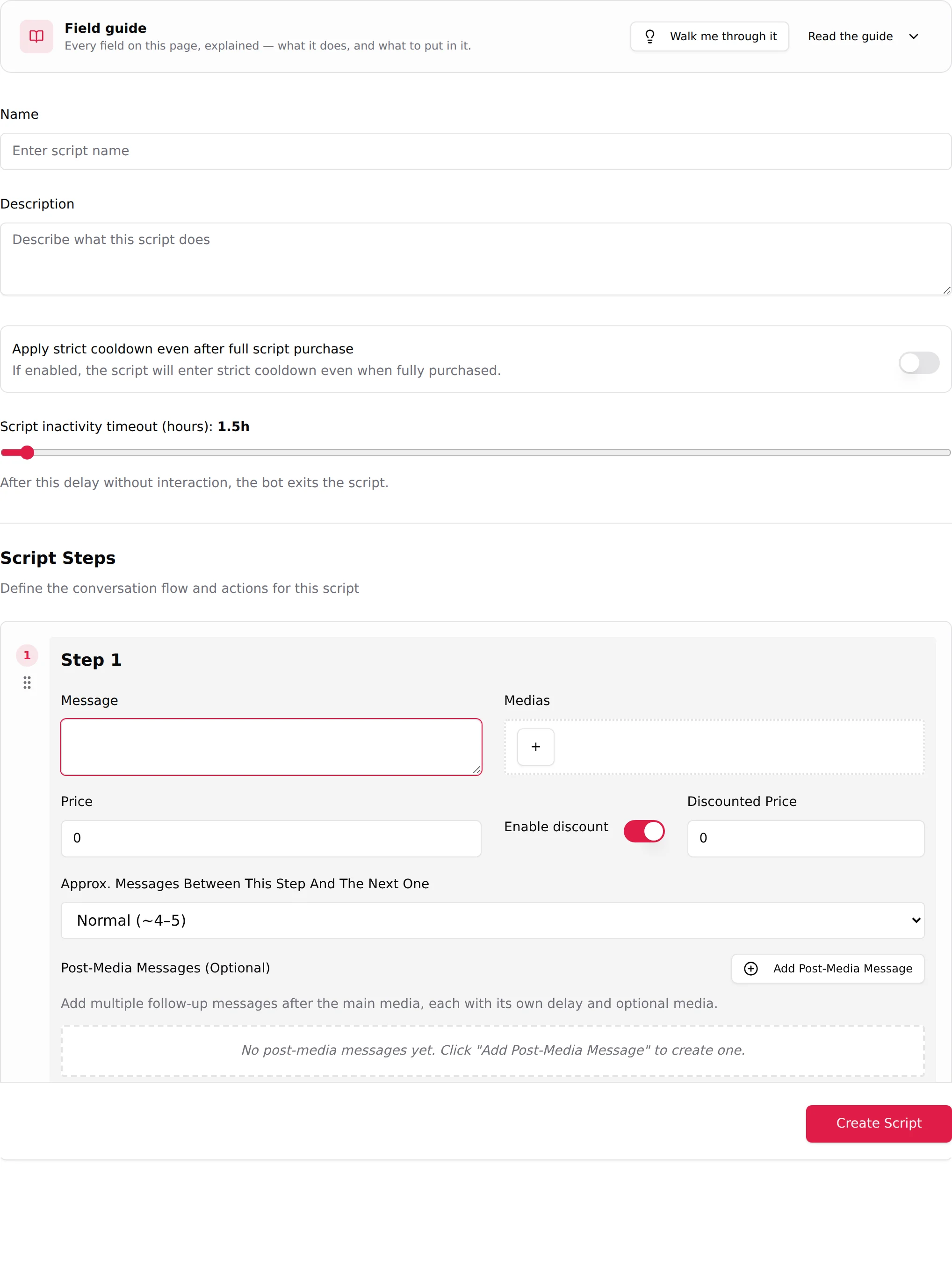
This one is per script, on the script editor page. Label "Script inactivity timeout (hours):", helper "After this delay without interaction, the bot exits the script."
| Control | Slider or number, on each script |
| Range | 0.5 to 48 hours |
| Default | 1.5 |
What it changes: how long a script stays "open" for a fan who stopped answering. While open, the AI keeps following up (at the Follow-Up Delay pace) and will send the next step when the fan comes back. Once the timeout passes, the AI has exited the script and does not pick it up where it stopped: a fan who comes back two hours later on a 1.5 h timeout, even to pay the step he left open, is outside the script, and most likely inside the Strict Script Cooldown. The PPV he was about to buy is sold again only when the next script reaches an equivalent step, or when you step in by hand. Set the timeout to the real rhythm of your fans, not to the shortest value.
Recommended: 1.5 (default) for short, cheap scripts; 4 to 8 for a long ladder with expensive final steps, so a fan who pays step 3 in the morning can still get step 4 at lunch.
Apply strict cooldown even after full script purchase
Switch on the script editor page, off by default. Helper: "If enabled, the script will enter strict cooldown even when fully purchased."
By default, a fan who buys every step of a script is not put in strict cooldown: he has shown he pays, and the AI is allowed to go straight into the next script, in the same conversation, as long as the fan shows he is still hot: he asks for more, he says he wants it to continue. No waiting time at all. Turn the switch on for scripts where you want the brake applied to buyers too, for example an expensive script you do not want followed by another pitch the same evening.
How the four timers chain in a real conversation
- Day 0. A fan subscribes. No script has ended yet, so the Minimum Sexualization Cooldown is not running: the AI chats, does KYC, and the Launch script conditions decide when the first script starts.
- Day 0, 20:00. The Launch script conditions are met. A script starts. The fan buys step 1 and step 2, then stops answering at 20:40.
- 22:10. Inactivity timeout (1.5 h) elapses. The AI exits the script. Both creator-wide brakes start now: Strict Script Cooldown (10 h) and Minimum Sexualization Cooldown (2 days).
- 22:10 to 08:10 next day. Strict Script Cooldown. The fan writes at 23:30 "show me more"; the AI flirts back but does not start a new script, whatever he says.
- Next day, 08:10, until day 2, 22:10. The strict cooldown is over but the sexualization cooldown still runs: the AI stays soft on its own initiative. If the fan asks for content, he gets the next unseen script; if he does not, the AI waits.
- Day 2, 22:10. The sexualization cooldown is over. The next time the Launch script conditions are met, the AI steers the conversation toward the next unseen script itself. Both counters restart when that script ends.
Good to know
- The two creator-wide sliders are saved with Submit on the Settings form. The two per-script timers are saved with Create Script / Update Script on the script editor.
- Fans never see a cooldown. What they see is a creator who "is not in the mood tonight", which is the point.
- On Telegram the same sliders exist with the same ranges.