
A script is a scene the AI plays out with a fan: a short story told in a fixed order of messages, each message carrying media, free at first and then paid. It is the only way the AI sells. Without scripts the AI can chat, learn who the fan is and tease, but it has nothing to send and nothing to price. With two or more active scripts, the AI picks the one that fits the conversation, launches it when the fan is warm, sends the free teasers, asks for the price of the first paid step, negotiates inside the limits you set, and moves down the ladder as the fan buys.
This page explains the vocabulary and the mechanics. The other pages of this section show how to build one field by field.
Where scripts live
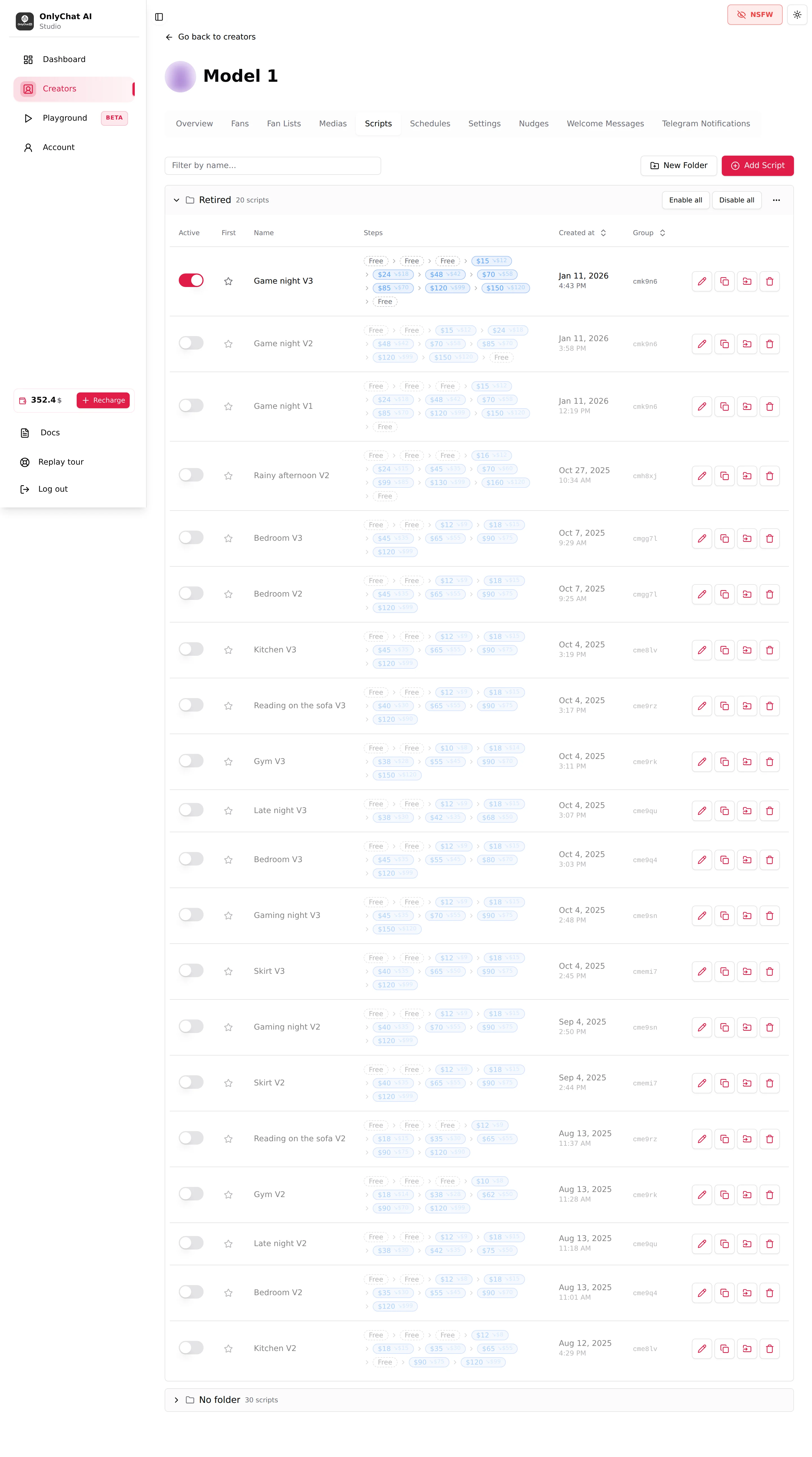
Every creator has a Scripts tab in its workspace, on OnlyFans and on Telegram. Each row is one script. The Steps column shows the ladder at a glance: dashed chips for free steps, price chips for paid steps, and a second smaller amount when a discount is enabled.
The pieces of a script
The scene
A script is one situation: a workout, a gaming session, a shower, a night in bed. The name is for you, the description is for the AI, and the steps are what the fan actually receives. The whole scene should hold together: same outfit, same place, same mood from the first free photo to the last paid video. The AI reads the media descriptions, so a set that jumps from a kitchen to a bathroom to a car reads as three scenes, not one.
Steps
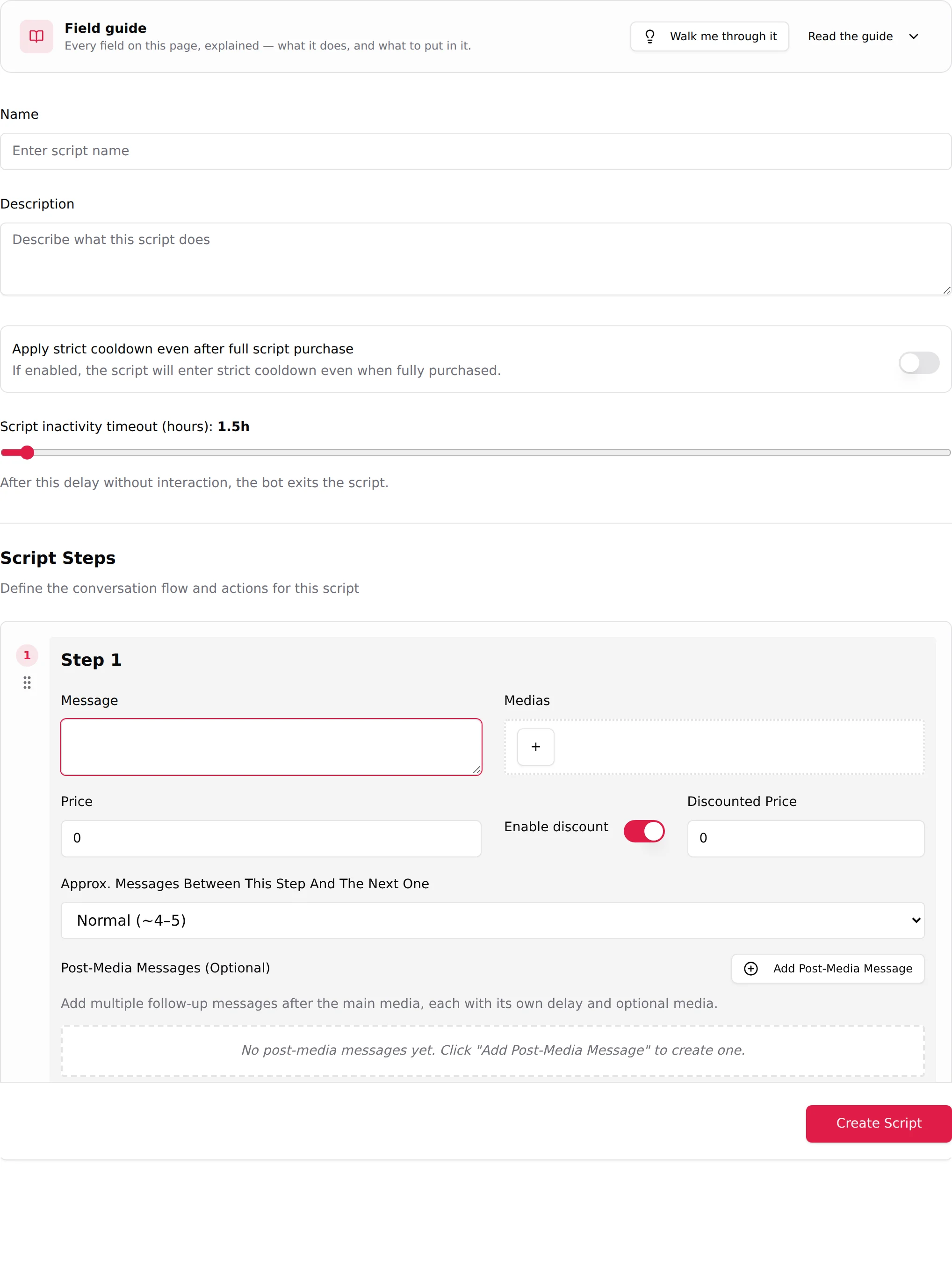
A step is one message plus its media, sent as a block. Steps are numbered and sent in order. Each step has a Message (the text written in the creator's voice), one or more Medias, a Price and a few timing options. The editor calls the list Script Steps ("Define the conversation flow and actions for this script"). See Script steps.
Free steps and paid steps
The Price field decides what kind of step it is. The field guide in the editor states it in three words: "Price 0 = Sent free". A price above 0 turns the step into a pay-per-view: on OnlyFans the media is locked in the chat until the fan pays, on Telegram the fan pays in Stars (or on a Dropp.fans link) and receives the media once paid.
Free steps are the warm-up: the fan sees the outfit, the place, a first tease, and the AI builds the tension between them. Paid steps are the sale. A typical script opens with two or three free steps, then a first paid step at a low price, then higher prices as the content gets more explicit.
The ladder
The sequence of prices is the ladder. It only goes up: $15, $24, $48, $70, $85, $120, $150 on the example above. Each paid step can also carry a Discounted Price that the AI falls back to when the fan refuses the full price. The ladder is what you tune when a script converts too well (underpriced) or not at all (too steep). See Prices and discounts.
The two timers
Above the steps, two settings decide how the script ends. Script inactivity timeout (hours) ("After this delay without interaction, the bot exits the script.", 0.5 to 48 hours, 1.5 by default) closes the scene when the fan disappears. Apply strict cooldown even after full script purchase decides whether a fan who bought everything enters the same rest period as one who stopped halfway. Both are explained in Create a script.
How the AI walks a fan through a script
Here is the life of one script in a real conversation with a fan of Model 1.
- Before the script. The fan writes. The AI answers in the creator's tone, asks a few questions (the KYC phase), teases. It does not send any media yet. The conditions to start a script are set by the Launch script strategy in Settings ("The conditions to meet before a script can start.", Normal or Aggressive).
- Choosing the script. When the conditions are met, the AI picks a script the fan has not seen. It reads each script's Description to decide which one fits the moment: a fan talking about his gym routine gets the workout scene, not the pajamas one. If a script is flagged First on the Scripts tab, that one goes first for every new fan. See Write a script description.
- Free steps. The AI sends step 1: the message exactly as you wrote it, plus its media. Then it keeps chatting for a few messages (the Approx. Messages Between This Step And The Next One setting of that step: Few, Normal or Many) before sending step 2, then step 3. The pacing is what makes the script feel like a conversation instead of a catalogue.
- The first paid step. The AI sends the message and the locked media at the step's price. If the fan buys, the AI reacts and continues to the next step after the usual pacing. If the fan hesitates, the AI defends the price (the Negotiation strategy) and can offer the Discounted Price you set on that step.
- Follow-ups. If the fan goes silent after a step, the Post-Media Messages of that step go out after their delay, each one a nudge written by you; they stop as soon as he replies (a silent payment does not stop them). If he stays silent for longer than the Script inactivity timeout, the AI leaves the script.
- After the script. Whether the fan bought everything or stopped, the script is marked as used for that fan and never sent to him again. If he stopped along the way, the AI then respects the Strict Script Cooldown set in Settings before it starts a new script; a fan who bought every step is not put in strict cooldown, unless the script's "strict cooldown even when fully purchased" switch is on. See Cooldowns.
Why scripts matter
- The AI cannot start without them. Enabling the AI on a creator with fewer than two scripts shows the dialog "Not Enough Scripts": "You must have at least 2 scripts to enable AI for this creator." (on Telegram: "at least 2 active scripts"). If you deactivate scripts and fall under two active ones, the AI switches itself off: "Scripts deactivated. AI has been disabled because you have less than 2 active scripts."
- Every fan burns through them. A script is sent once per fan. The Scripts used column of the Fans tab shows "x / y": how many of your scripts this fan has already received. When the counter reaches the total, the fan has nothing left to buy from the AI until you add a new script. Ten scripts is a comfortable stock; two is a start.
- They carry the whole revenue. The dashboard measures sales per script and per step (Best Script on the Overview, the Scripts tab of the dashboard with Sent, Paid, Conv. and Rev. per step). Weak scripts are visible in numbers and can be retired; strong ones can be duplicated into variations. See Activate and monitor a script.
- Media only sells through them. A media item synced or uploaded on the Medias tab is never sent on its own initiative by the AI. It has to be attached to a step.
Before you write your first script
- Prepare the mediaOn the Medias tab, sync the vault list (OnlyFans) or upload the folder (Telegram) that holds the scene, then write a description for every item you will use. The field guide says it plainly: "Media comes from = Medias tab". See Media library.
- Sort the media into stepsDecide which two or three items are free, which one opens the paid part at a low price, and which ones close the scene at the top of the ladder. See Media per step.
- Create the scriptClick Add Script, fill the name, the description, the timers, then one step card per message. See Create a script.
- Activate itA saved script is inactive. Flip the Active switch on the Scripts tab, and star the one you want sent first. See Activate and monitor a script.