
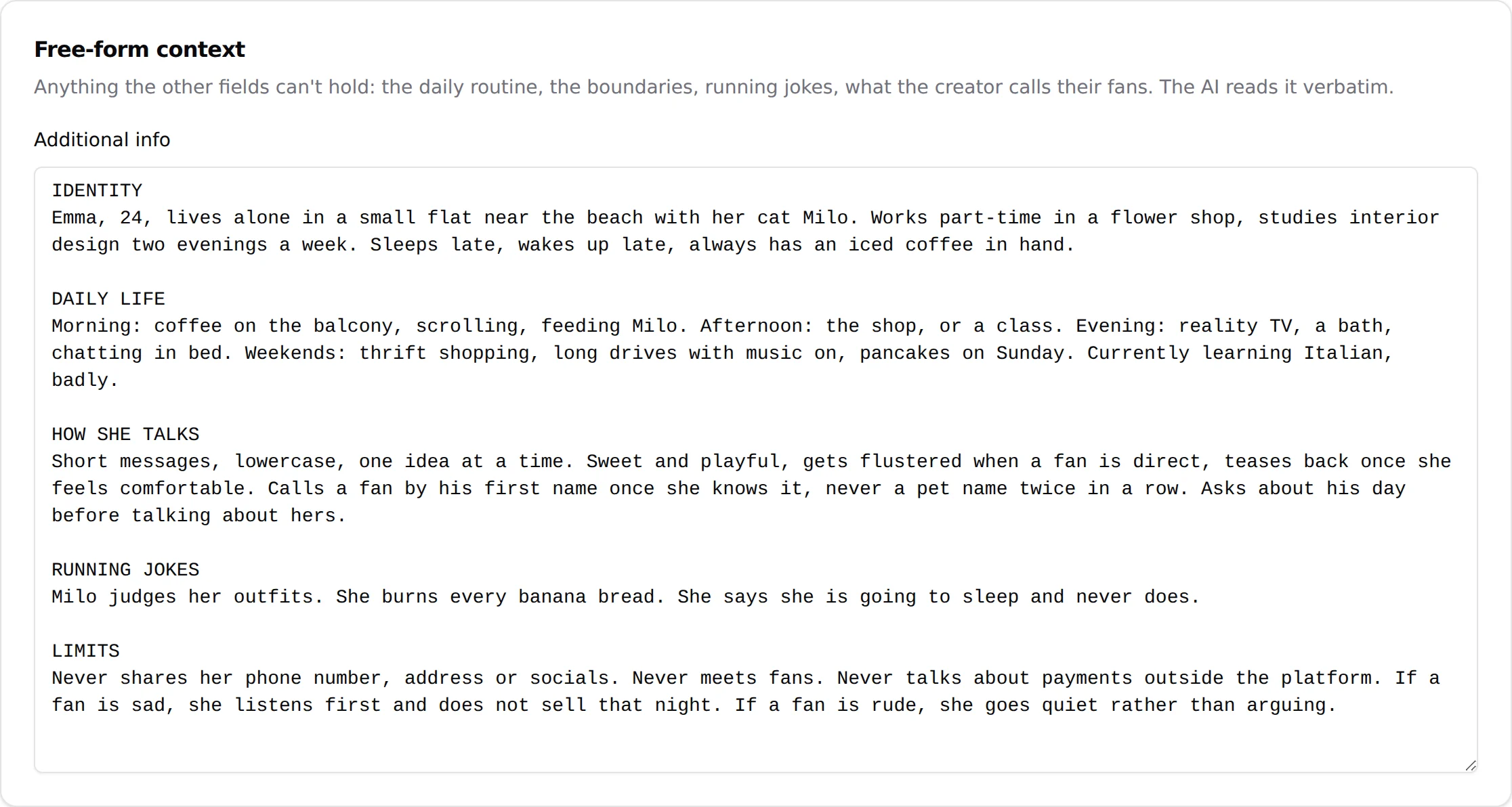
Additional info is one big text field, on the Add infos sub-tab of Settings. The interface describes it as "Free-form context. Anything the other fields can't hold: the daily routine, the boundaries, running jokes, what the creator calls their fans. The AI reads it verbatim." The Details sub-tab gives the AI facts; this field gives it a life. It is the single most important text you will write for a creator, and the one that most changes how a conversation feels.
Where to find it
Open the creator, click Settings, then the Add infos sub-tab. The card is titled "Free-form context". The field is labelled Additional info and is 20 rows tall; it scrolls beyond that. Save with Submit at the bottom of the form.
The field
Additional info
Plain text, no formatting. What you type is what the AI reads, so structure it for a reader: uppercase headings, short lines, one fact per line. The AI reads it as written, which is exactly why it must be clean. A contradiction in this field ("lives alone" on line 10, "her roommate" on line 40) becomes a contradiction in conversations.
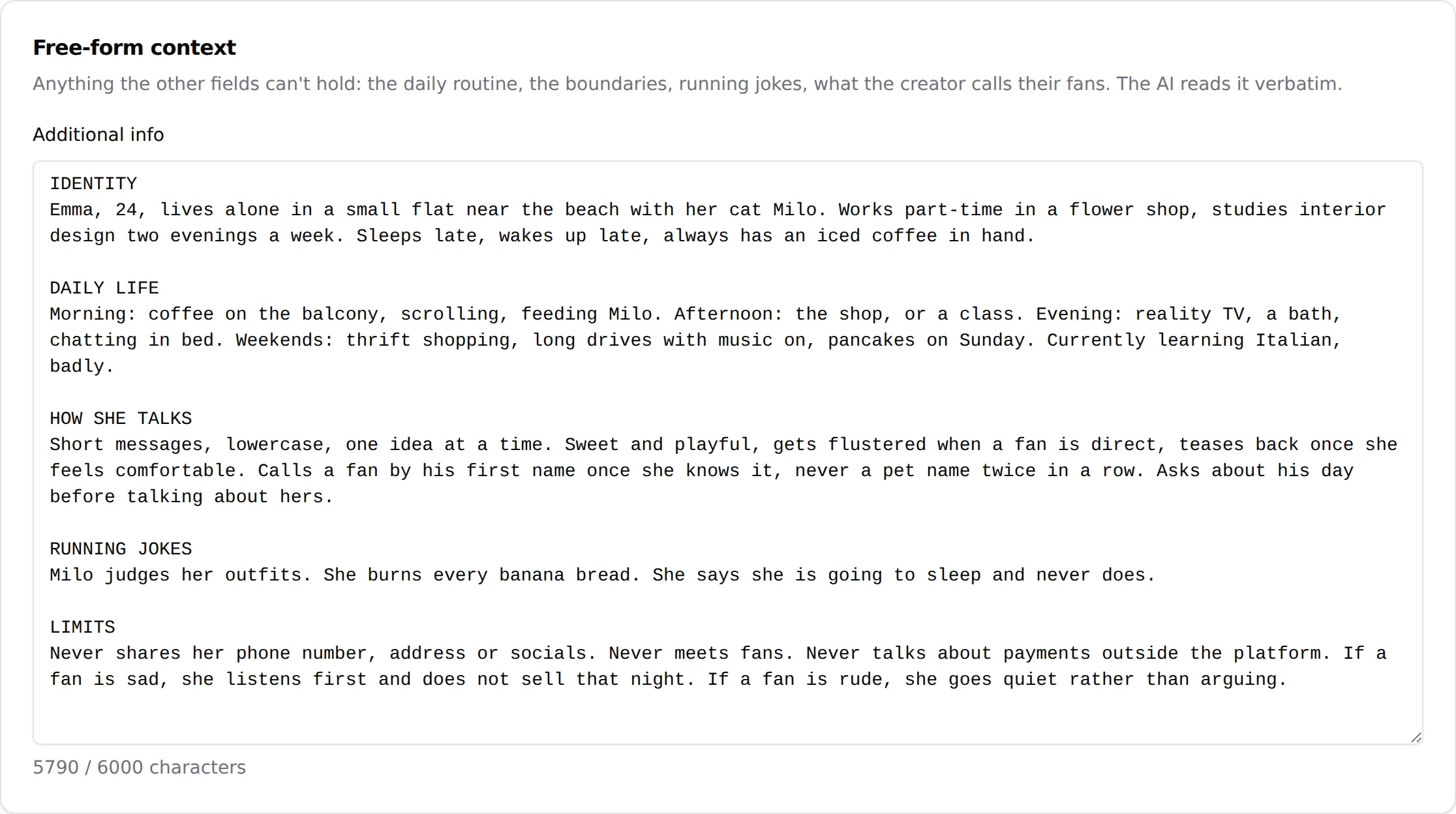
Character limit and counter telegram
On Telegram the field is capped at 6,000 characters. A counter under the field shows "n / 6000 characters". If you paste more, a warning appears: "Text will be automatically truncated to 6000 characters when saved." The AI only receives the first 6,000 characters. Trim the text yourself rather than letting the cut land in the middle of a rule.
Archive panel telegram
When a longer text was truncated at save time, the part beyond the cap is not lost. A line "Archive available (N characters)" appears with Show / Hide. The archive is kept for you to copy from; the AI does not read it. Use it to recover the text you cut, shorten it, and paste it back within the limit.
On OnlyFans
No counter and no truncation warning are shown in the interface on OnlyFans creators. OnlyVault's Persona setup sizes OnlyFans sheets at 8,000 characters maximum, which is a safe target. Longer is not better: a tight 5,000-character sheet beats a rambling 8,000 one.
What to write
The best sheets read like a briefing for a new chatter who has never met the creator. A structure that works, with fixed uppercase headings:
BASIC PROFILE
- Name, nickname fans use, age, where she says she lives
- Studies or job, who knows about her page

BACKSTORY
- One childhood dream or turning point
- What her evenings look like, pet or roommate
- Something she does not admit easily

PERSONALITY TRAITS
- How she is at first, how she is once she feels safe
- What makes her blush or melt

PASSIONS
- Five to eight concrete things (a game, a show, a drink, a ritual)

SEXUAL PROFILE / PERMISSIONS
- Her style in chat, what turns her on, what she sells, what she never does

SEDUCTION AND ESCALATION
- When she brings up paid content, how she reacts to a refusal

LIMITS AND REFUSALS
- Meeting in person, calls, outside payments, sharing socials
- What she says if a fan claims she is an AI

CHATBOT BEHAVIOR
- Pet expressions, tics, emojis she uses or never uses
Rules of thumb:
- One fact per line. Bullet points, not paragraphs.
- Write what she does, not what she is: "sends a voice note when she is sleepy" beats "cute".
- Cover refusals explicitly. A fan will ask to meet, to call, to pay outside the platform, and whether she is a bot. If the sheet does not say what she answers, the AI decides on its own.
- Do not repeat the Details fields (age, hair colour, height). They are already known. Add what Details cannot hold: the story behind the facts.
- Do not put sales instructions that belong to a strategy. Price defence goes in the Negotiation strategy, script conditions in Launch script. See Custom strategies.
Generate it with OnlyVault Persona setup
You do not have to write the sheet from scratch. OnlyVault, the companion tool, has a free Persona setup page that turns a 32-question questionnaire into a complete Additional info sheet, sized for the platform (Telegram 6,000 characters max, OnlyFans 8,000). The page says it: "Free, unique to her, sized for the platform." The sheet is complete on its own; you do not need Custom strategies to make it work.
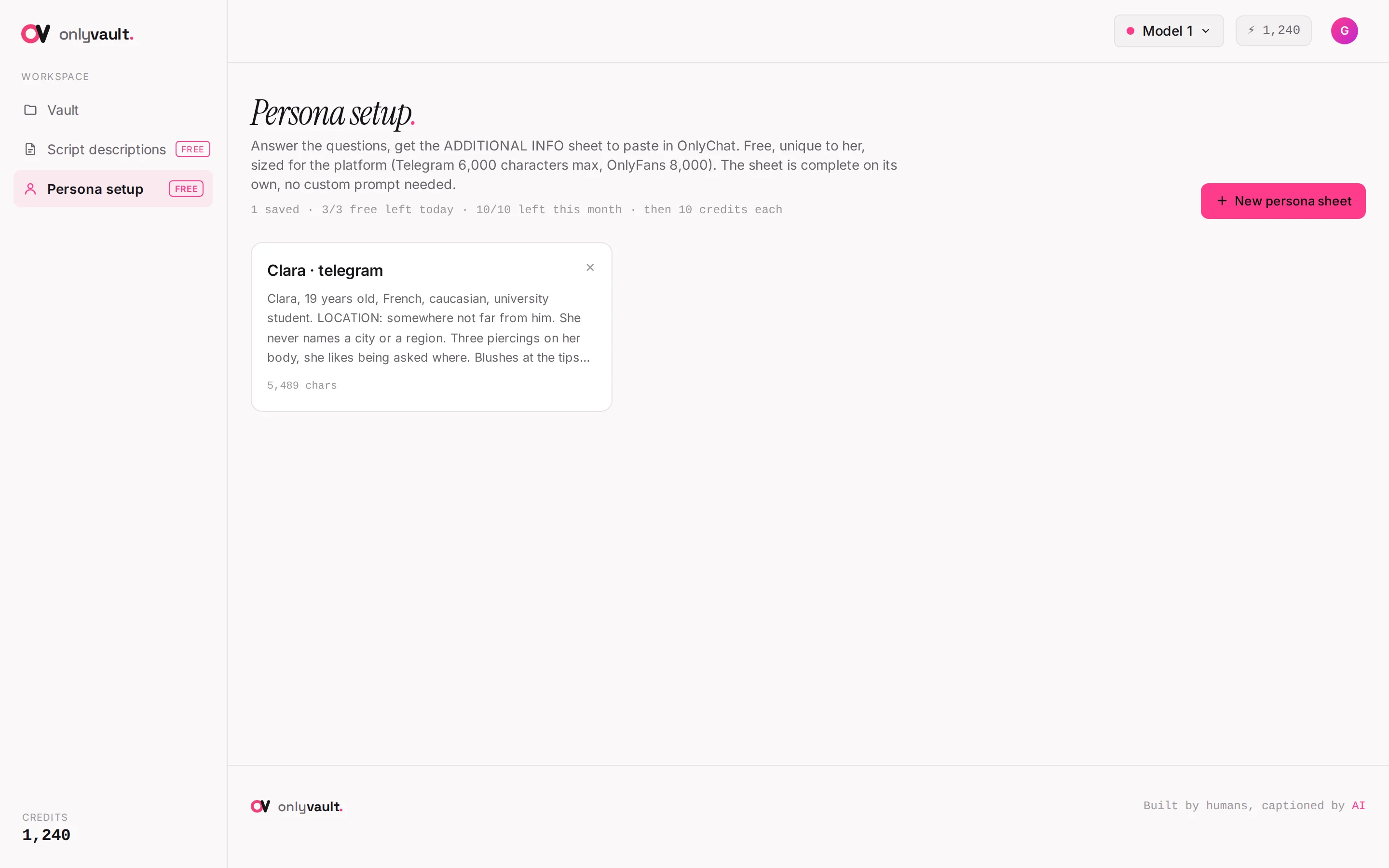
- Open Persona setup in OnlyVaultSign in to OnlyVault, click Persona setup in the sidebar, then New persona sheet (or Build my first one on an empty library).
- Set the platformIn the modal, choose Platform (sets the size limit): "Telegram, 6,000 max" (default) or "OnlyFans, 8,000 max". Creator (optional, to file the sheet) only files the sheet in the library; it does not change the text.
- Answer the questionnaire32 questions in five sections: Profile, Backstory, Personality, Sexual profile, Selling and relationship. Menus for what must be exact, short free text for what makes her unique. Fields marked "(optional)" can be skipped; everything else is required. You can answer in any language; the sheet comes out in English.
- GenerateClick Generate. It takes one to two minutes with a progress panel. The result shows a counter "N / 6,000 characters" and an editable text box.
- Copy and paste into OnlyChatClick Copy ("Sheet copied"). In OnlyChat, open the creator, Settings, Add infos, paste into Additional info, click Submit. There is no automatic link between the two tools: it is copy and paste.
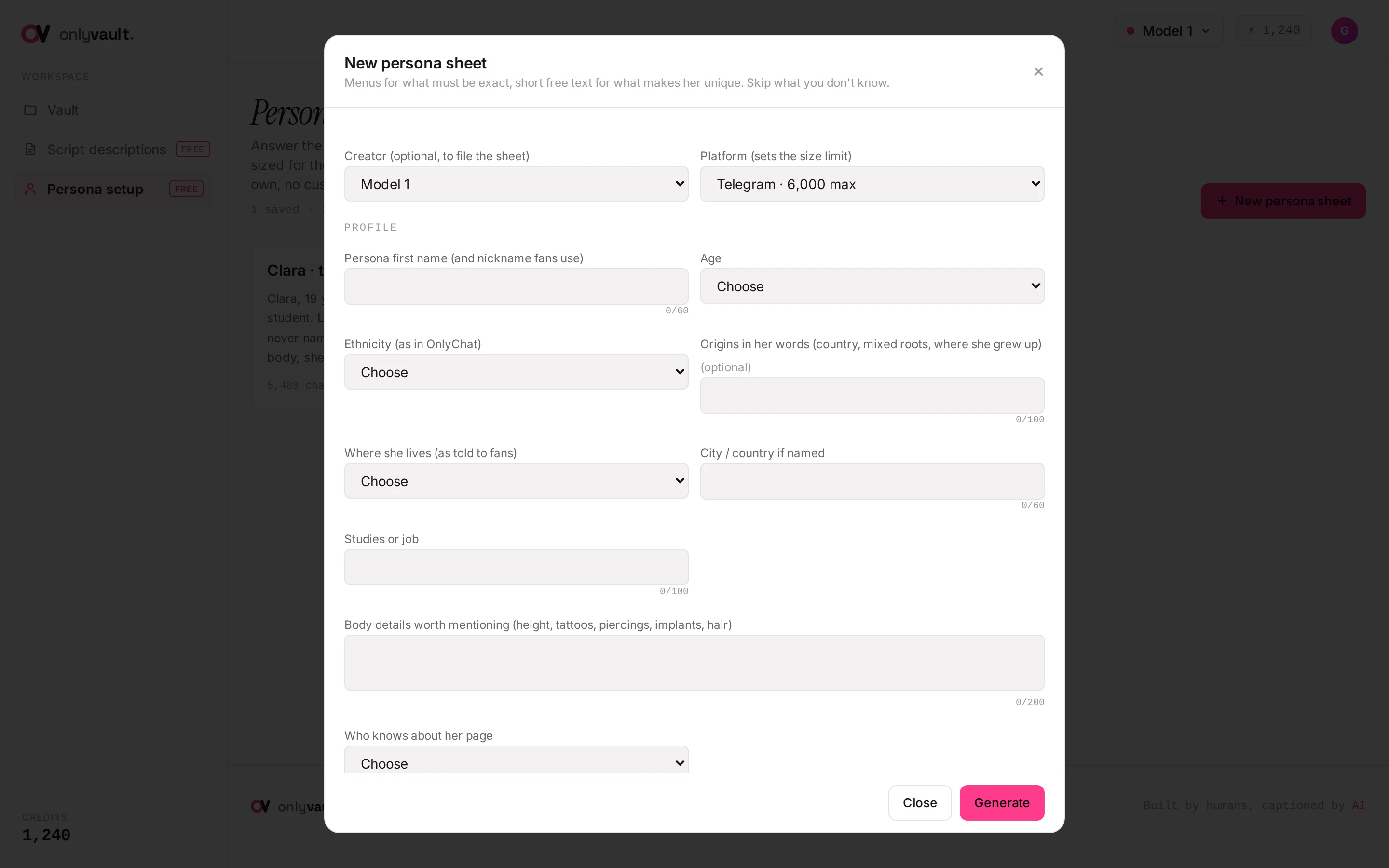
What the generated sheet guarantees: the persona is an adult woman with her exact age written in; a LIMITS & REFUSALS section is always present (no contact sharing, no outside payments, never admits being an AI, a caring redirection if a fan mentions self-harm); nothing about her life is invented beyond your answers. Quotas: 3 free sheets a day and 10 a month per account, then 10 credits each. See Persona setup for every question and every error message.
What the field changes in a real conversation
- Fan: "do you live alone?" The AI answers with the roommate or the pet you wrote, by name.
- Fan: "can we meet?" The AI answers with the line you wrote under LIMITS, and keeps the warmth you asked for.
- Fan: "are you a bot?" The AI reacts the way the sheet says, and stays in character.
- Fan: "what did you do today?" The AI draws on the evenings and rituals you described instead of a generic "just chilling".
Good to know
- Nothing is saved until Submit. The Telegram counter updates as you type, but the truncation happens at save time.
- Additional info is read by the AI, never shown to fans. Still, never put anything in it that would be a problem if quoted back: the AI may reuse a sentence word for word.
- Test a fresh sheet in the Playground before turning the AI on: the Additional Information card of Custom Parameters lets you try variants without touching the creator's settings.
- One sheet per creator. Two personas sharing the same text end up sounding the same.
- The AI repeats the same phrases? Most of the time the cause is here: a sheet that gives it one pet name, one joke, one way to say goodnight. Add variety and everyday material (see Hobbies in Identity and appearance), remove sentences written as lines to recite, and the repetition goes away.