
On Telegram, OnlyChat replies to fans from the creator's own Telegram profile. A fan opens the creator's chat, writes, and gets an answer from the creator's account, not from a separate bot chat. The AI walks the fan through your scripts, sends the free media, sells the paid media in Telegram Stars, and comes back when the fan goes quiet. You watch everything from the OnlyChat dashboard: fans, revenue, scripts, settings, alerts.
This page explains the moving parts once, so that the setup articles that follow make sense. Read it before you create your first Telegram creator.
The four pieces
| Piece | What it is | Where you handle it |
|---|---|---|
| The creator's Telegram account | The profile fans talk to. It needs Telegram Premium, because Telegram Business is part of Premium. | The Telegram app, on the creator's phone |
| Telegram Business | The set of business features in the Telegram app. One of them, "Chatbots", lets a bot read and answer the account's private chats. | Telegram app: Settings, Telegram Business, Chatbots |
| The bot | A technical object you create in BotFather. OnlyChat connects to it with a token. The bot is the bridge between the creator's account and OnlyChat. Fans never need to open the bot. | BotFather, then the OnlyChat wizard |
| Secretary Mode | A BotFather setting on the bot. It has to be on for the bot to be attachable to a Telegram Business account. | BotFather: /mybots, Bot Settings, Secretary Mode |
When all four are in place, Telegram sends OnlyChat a "business connection" event. From then on, the bot can read the messages fans send to the creator's account and reply in the creator's name. OnlyChat calls this the business connection, and the creator's workspace stays locked behind a setup page until it exists (see Telegram setup).
Where it lives in OnlyChat
Every Telegram creator is a card on the Creators board, with the Telegram glyph, the bot handle and the business connection handle. The board also shows how many Telegram licenses are active and available, in a pool separate from OnlyFans licenses.
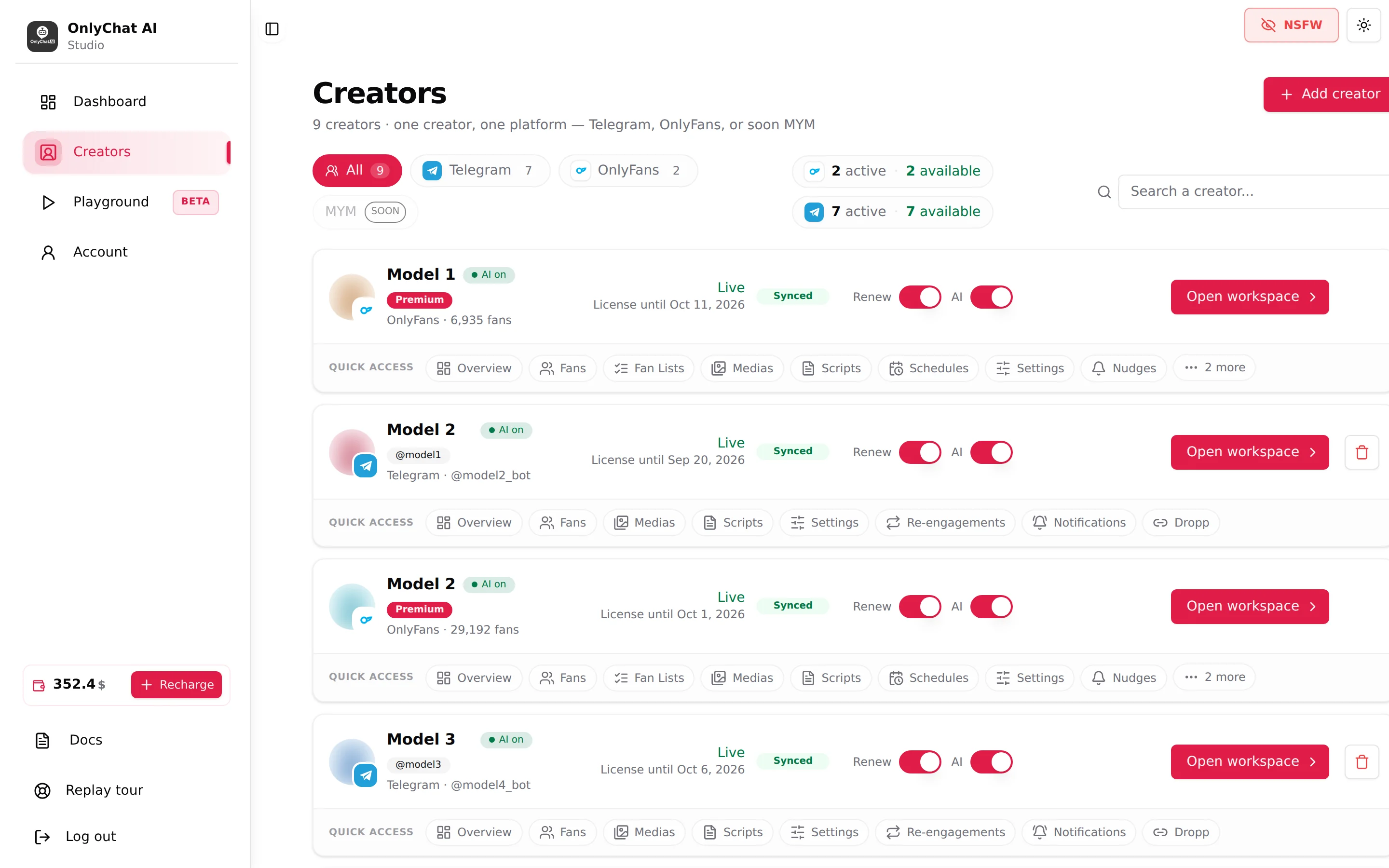
Clicking Open workspace takes you to the Telegram workspace and its eight tabs: Overview, Fans, Medias, Scripts, Settings, Re-engagements, Notifications, Dropp. They are described in The Telegram workspace.
What the AI does in a real conversation
- A fan writes to the creator's profile. Telegram forwards the message to the bot, the bot forwards it to OnlyChat.
- The AI answers in the creator's voice, using the identity, appearance, personality and Additional info you filled in the Settings tab.
- When the conditions of the "Launch script" strategy are met, the AI starts one of the active scripts: free teasers first, then paid steps priced in Stars.
- The fan pays inside the chat. Telegram Stars are Telegram's in-app currency; the fan buys Stars with the payment methods Telegram offers, then unlocks the media. OnlyChat shows the sale in Stars with a dollar conversion.
- If the fan goes quiet, the Re-engagements timeline sends up to four timed messages in the 24 hours that follow the fan's last message.
- Every sale, AI shutdown, exhausted script or rate limit can ping your own Telegram group through the Notifications tab.
Two payment paths exist. Stars are the default: the price of every paid step is in Stars, the fan pays without leaving the chat. Dropp.fans is the alternative: a step can carry a Dropp.fans payment link instead of a Stars price, and the fan pays on Dropp. See Telegram Stars and Dropp.fans.
What you need before you start
- A Telegram account to own the bot. This is the account that talks to BotFather. Keep it separate from the creator's account: the owner account is the one that guarantees access to the bot and its token.
- The creator's Telegram account with Telegram Premium. Telegram Business is included in Premium. Without it, the "Chatbots" menu does not exist and the bot cannot be connected.
- A Telegram license in OnlyChat. $20 per month per creator, plus 15% commission on the net revenue the AI sells. Bought from Account, Balance & Licenses, singly or in bulk packs. See Plans and commission.
- A positive balance. The AI switch refuses to turn on with the dialog "Insufficient Balance" otherwise.
- At least 2 active scripts in the creator's Scripts tab. Below that, the switch shows "Not Enough Scripts".
- Media uploaded into folders on the Medias tab, each with a description, so the scripts have something to send.
The five steps, in order
- Create the bot in BotFatherSend /newbot, pick a display name and a username, copy the token. See Create a Telegram bot.
- Add the creator in OnlyChatCreators, Add creator, Telegram. The 3-step wizard asks for a name, the bot username and the token. See Add a Telegram creator.
- Assign a Telegram licenseFrom the creator card, Assign License. See Assign a Telegram license.
- Connect the creator's accountTurn Secretary Mode on in BotFather, connect the bot in Telegram Business, enable the 5 permissions, then click Verify business connection on the setup page. See Telegram setup.
- Fill the workspace and turn the AI onMedia, at least 2 scripts, Settings, then the AI switch. See Turn the AI on.
Telegram compared with OnlyFans
| Telegram | OnlyFans | |
|---|---|---|
| How OnlyChat connects | Bot token plus Telegram Business connection | Browser extension on the creator's session |
| Currency of paid steps | Stars (or a Dropp.fans link) | Dollars |
| Media source | Uploaded into folders on the Medias tab, or imported from another bot | Synced from the OnlyFans vault |
| Fan conversation page | Read-only, with a Fan note | Read-only history plus a composer to write yourself |
| Answering a fan by hand | From the creator's own Telegram app after pausing the AI for that fan, for text. A paid Stars PPV can be sent by hand from the OnlyChat composer with Send a PPV by hand, and carries commission (15% or 4%) | From the OnlyChat composer or from OnlyFans |
| Re-engagement of quiet fans | Re-engagements tab (timeline, up to 4 checkpoints) | Nudges tab (Premium) |
| Alerts to your Telegram group | Notifications tab, included with the license | Telegram Notifications tab, Premium only |
| Not available | Fan Lists, Schedules, Nudges, Welcome Messages | Re-engagements, Dropp |
| License | $20 per month, 15% commission on AI net revenue | Basic $20 or Premium $70 per month, 10% commission |