
Once the AI is live, running a creator is a monitoring job, not a chatting job. The AI answers, sells and follows up on its own; your role is to make sure nothing is blocking it (balance, license, session, scripts) and to feed it better material over time (scripts, media descriptions, settings). This page is the checklist an operator runs on OnlyChat: ten minutes every morning, thirty minutes once a week, plus the cases where a human should step in.
Every day
1. Dashboard: did yesterday sell?
Open Dashboard. Keep All platforms if you run both, pick Last 7 Days (the default) and compare today's bar with the previous days. The KPI cards to read:
| Card | Text under it in the app | What a drop means |
|---|---|---|
| Total Revenue | "Total gross/net revenue generated from all sales (AI + Manual)" | Fewer fans, fewer scripts sold, or the AI was off part of the day. |
| AI Revenue | "generated exclusively by AI automation" | If it falls while Total holds, humans took over more conversations. |
| AI Sales | "Total number of sales transactions generated by AI" | Sales count. Combine with Unlock Rate. |
| Unlock Rate | "Percentage of paid media content that has been unlocked by fans" | Fewer fans paying for what was sent: prices too high, wrong script for the audience, weak media descriptions. |
| Best Script | "Most profitable script based on total revenue generated" | Which scene carried the period. |
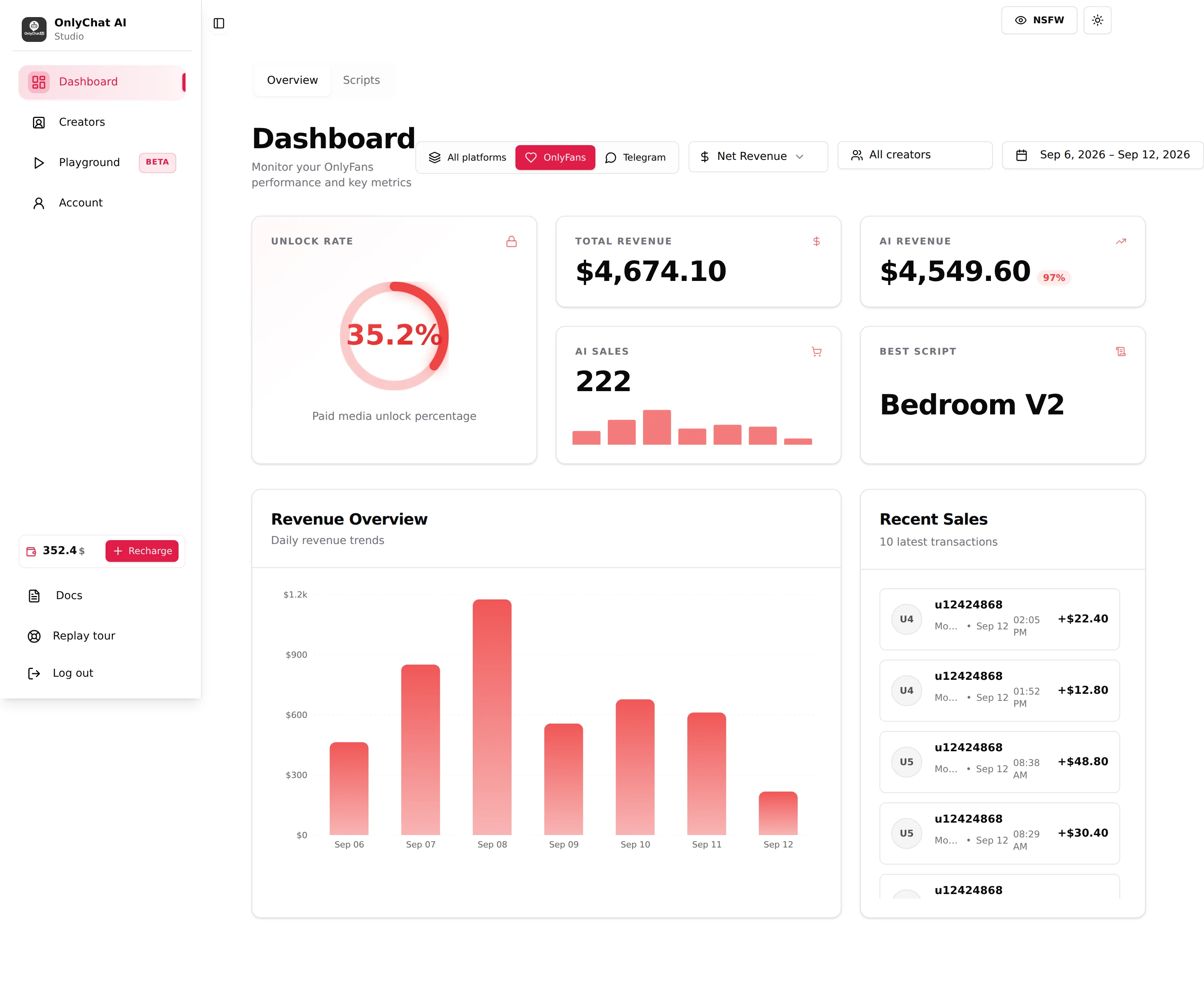
On OnlyFans, switch Net Revenue / Gross Revenue depending on what you report: net subtracts the OnlyFans cut. On Telegram, use the Stars · Dropp · Total buttons to see Stars sales, Dropp.fans sales, or both.
2. Creators board: is everyone Live?
Open Creators. Scan the cards top to bottom:
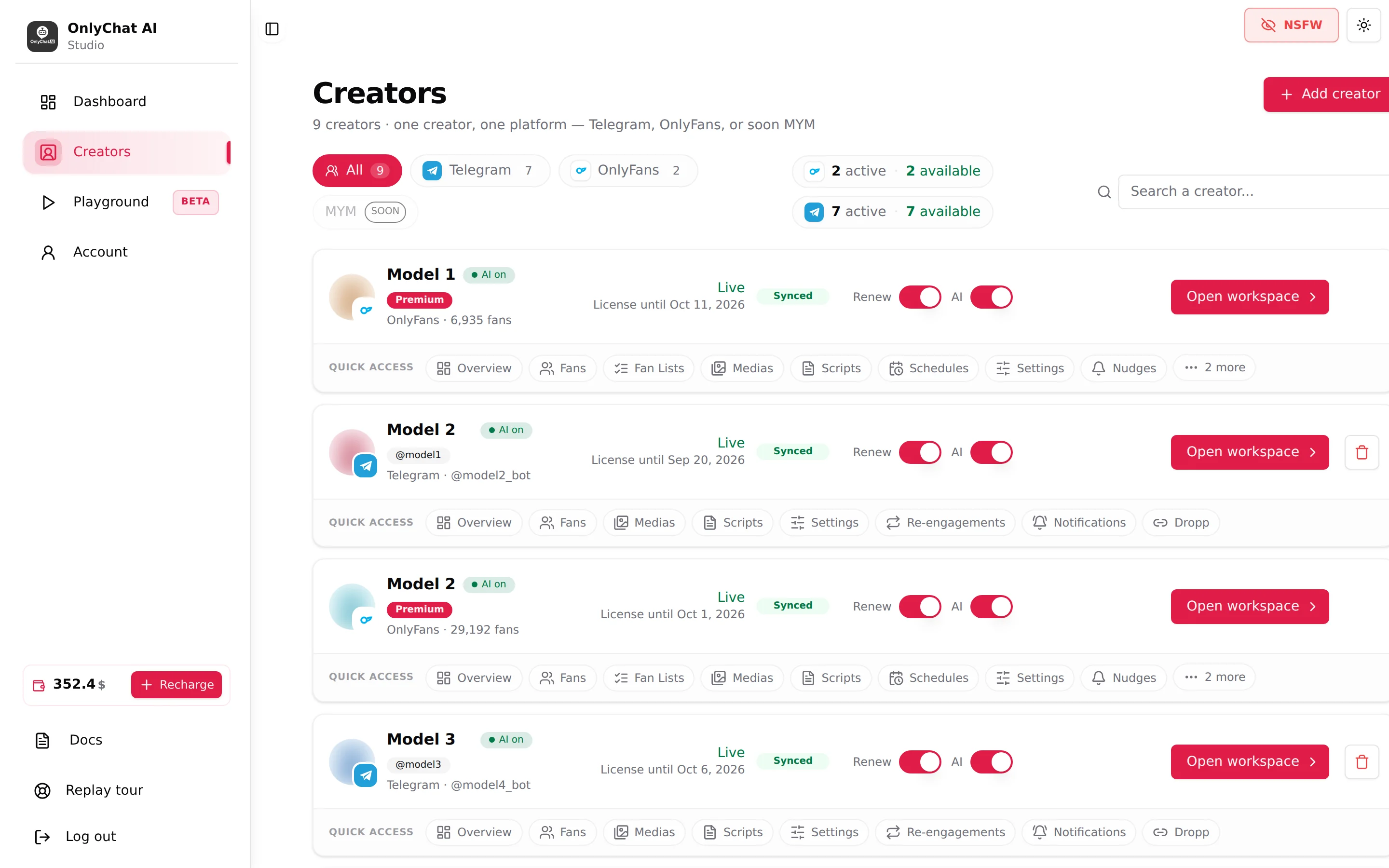
- Status must read Live on every creator that should be selling. Ready to launch means the AI switch is off. No active license means the license expired or was never assigned.
- OnlyFans cards must show Synced. Sync warning or Sync error means the OnlyFans session the extension gave to OnlyChat is in trouble: re-sync from the extension before the AI loses the ability to read and send. See Extension and sync issues.
- Telegram cards must show the "@username" of the connected business account, not "Not connected".
- AI on badge on each card that should be live. If a card shows AI off and nobody turned it off, the app disabled it: fewer than 2 active scripts, or the balance went negative.
3. Balance: can you cover the next renewal?
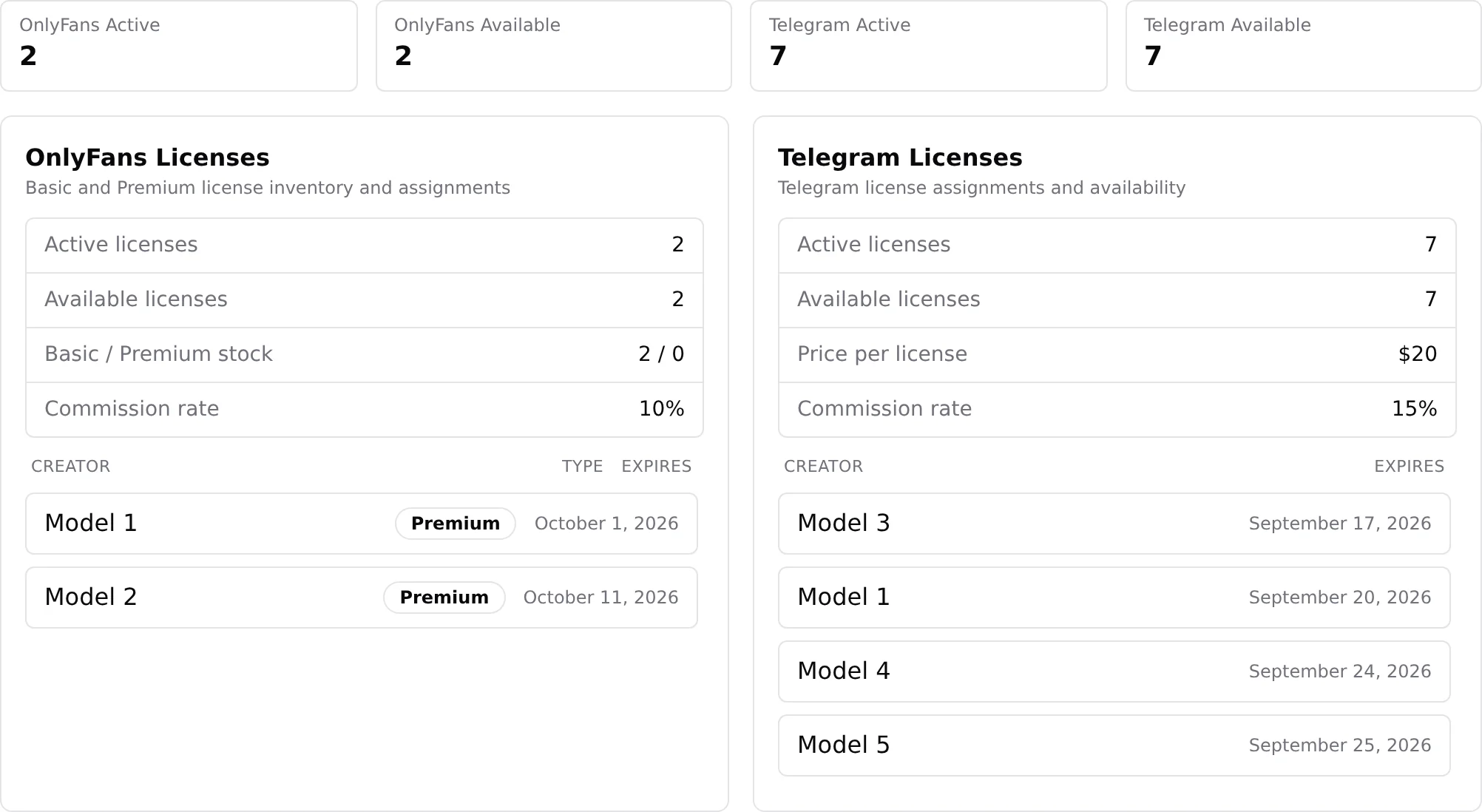
The sidebar widget shows the balance. Keep it above the sum of the licenses renewing this week. With Renew on, "this license is bought again from your balance when it expires"; with an empty balance the renewal fails and the creator goes offline. Set an email alert on Account, Notifications ("Receive email alerts", "Alert threshold ($)") so you are warned before it happens. See Low balance alerts.
4. Licenses: who expires this week?
The license chips on the board ("N active · N available") and the Licenses cards on Account, Balance and Licenses list each creator with its Expires date. Anything expiring in the next 7 days with Renew off needs a decision now.
5. Fans: anyone stuck?
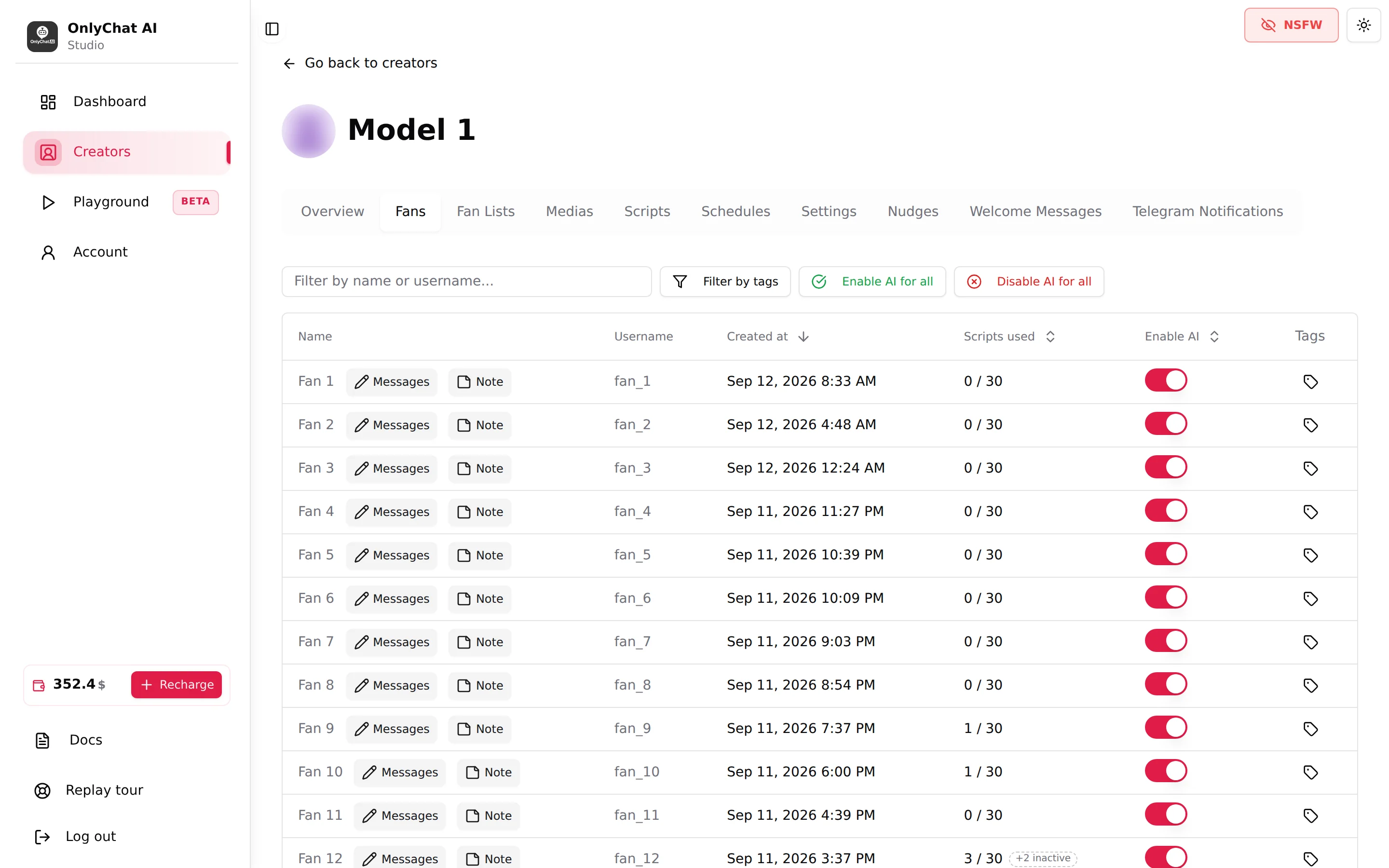
Open the Fans tab of your main creators. Sort mentally by Scripts used: a fan whose counter turns red has seen every active script and the AI has nothing new to sell him. That is your signal to add a script or a variation. On Telegram the table also shows Last interaction and Total spent: a big spender silent for days is a candidate for a personal message from the creator.
Every week
Scripts analytics
Dashboard, Scripts tab. Sort by Best revenue then by Best conversion. Expand a row to read the Steps Detail: for each step, Sent · Paid · Conv. · Rev.. The tour puts it in five words: "duplicate winners, retire losers".
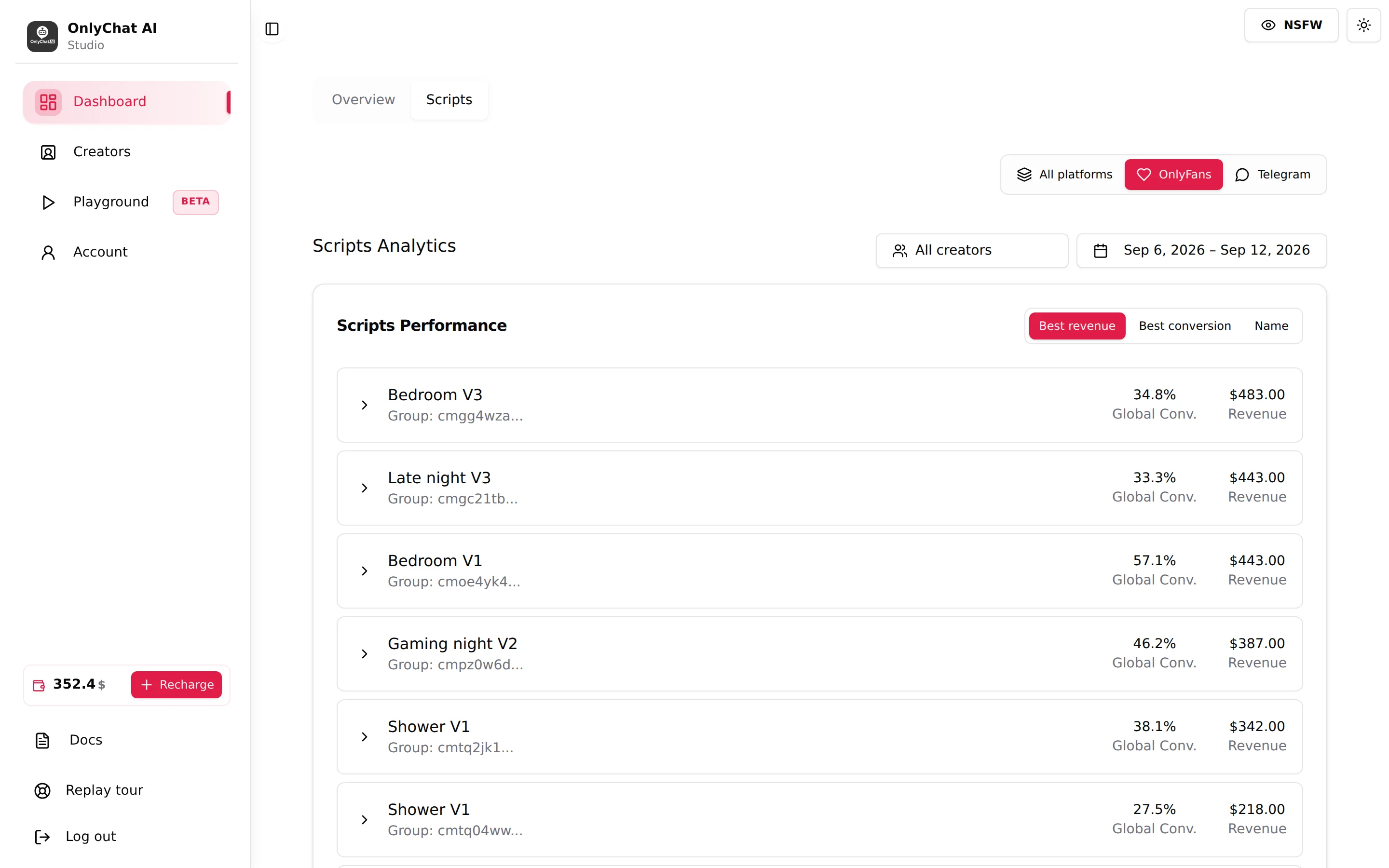
What to do with it:
- A script with many Sent and few Paid on step 1: the first paid step is too expensive or the free teaser does not sell the paid one. Lower the price or enable a discount on that step.
- A script that converts well but is rarely sent: the AI does not find a reason to launch it. Rewrite its Description so the AI knows when it fits. See Write a script description.
- A winner: create a variation with Create Variation and change one thing (price, order, teaser). Variations stay in the same Group, so the dashboard compares them.
- A loser after two weeks: deactivate it, keeping at least 2 active scripts.
Unlock rate and prices
Compare Unlock Rate week over week per creator (use the creator select). A falling rate with stable traffic usually means the audience changed or prices crept up through new scripts. Check the price ladder of the newest scripts. See Prices and discounts.
Media and descriptions
Medias tab: every media attached to a step must have a description ("Ready for AI" tick). On OnlyFans, run Sync Media after the creator added content to the vault: it "only brings in what's new, nothing you wrote here is overwritten". See Media library.
Settings drift
Re-read the Settings tab of each creator once a week: Additional info (new boundaries, a trip, a new routine), Languages, and the Strategies cards. If you switched a phase to Custom, check that results did not degrade; the default "was tuned on real conversations".
Fan Lists (OnlyFans)
Click Update lists to refresh the lists from OnlyFans, then check the summary "N active · N excluded · N lists on OnlyFans". A new list created on OnlyFans is not answered until you add it to Active lists. See Fan lists.
When to intervene
The AI handles the routine. Step in when:
| Situation | What to do |
|---|---|
| A fan asks for something only the creator can do (a custom, a meeting, a specific request outside the scripts) | On OnlyFans, turn the fan's Enable AI switch off and answer from the fan conversation composer or from OnlyFans. On Telegram, turn the fan's switch off and let the creator reply from their Telegram app. |
| A fan is upset, threatens a chargeback, or mentions the platform's rules | Take over. Leave the AI off for that fan until it is settled. |
| A fan's counter in Scripts used is red | Do not intervene in the chat: add a script or a variation instead. |
| Sync warning / Sync error on the card | Re-sync from the extension. The AI cannot read or send while the session is broken. |
| Balance alert email | Recharge before the next renewal date. |
| "AI Disabled" alert on Telegram | Open the Scripts tab (fewer than 2 active?) and the balance. |
How to take over a conversation cleanly is described in Human takeover. Remember that sales you close by hand count in Total Revenue but not in AI Revenue, and are not commissioned once the AI has been off for that fan for more than 30 minutes (before that, the anti-fraud rule applies).