
Prices live on the steps. Each paid step has a Price (what the AI asks first) and, optionally, a Discounted Price (the lowest the AI will accept for that step). Read together from the first paid step to the last, they form the ladder of a script. The AI never invents a price: it asks yours, defends it with the Negotiation strategy set in Settings, and only comes down to the discounted amount you wrote. This page explains how to build the ladder, what the discount really does, and the Telegram specifics.
Where prices are set and seen
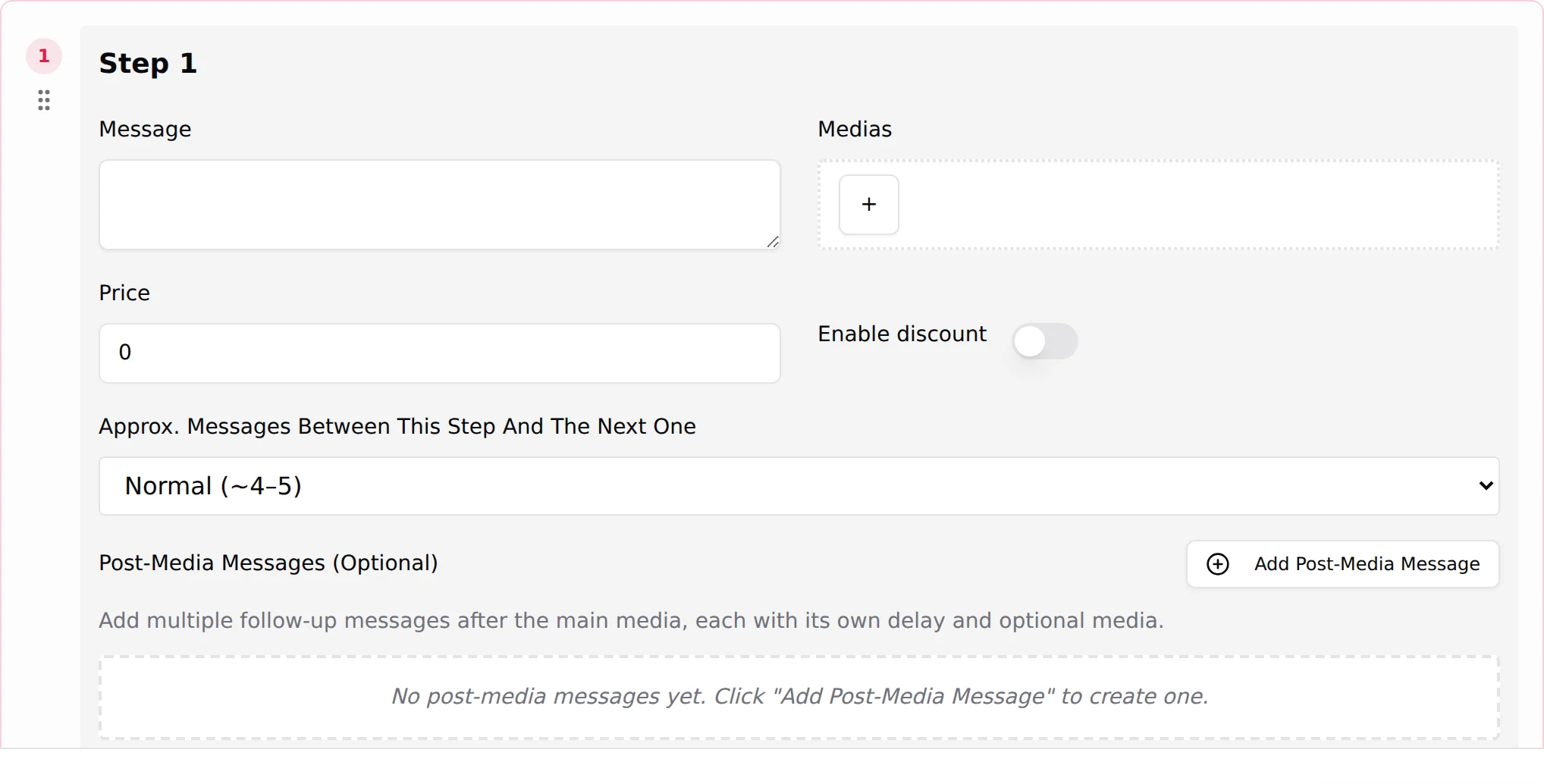
On the step card: Price (dollars on OnlyFans; Price (Stars) on Telegram), then Enable discount and Discounted Price (Telegram: Discounted Price (Stars)). See Script steps.
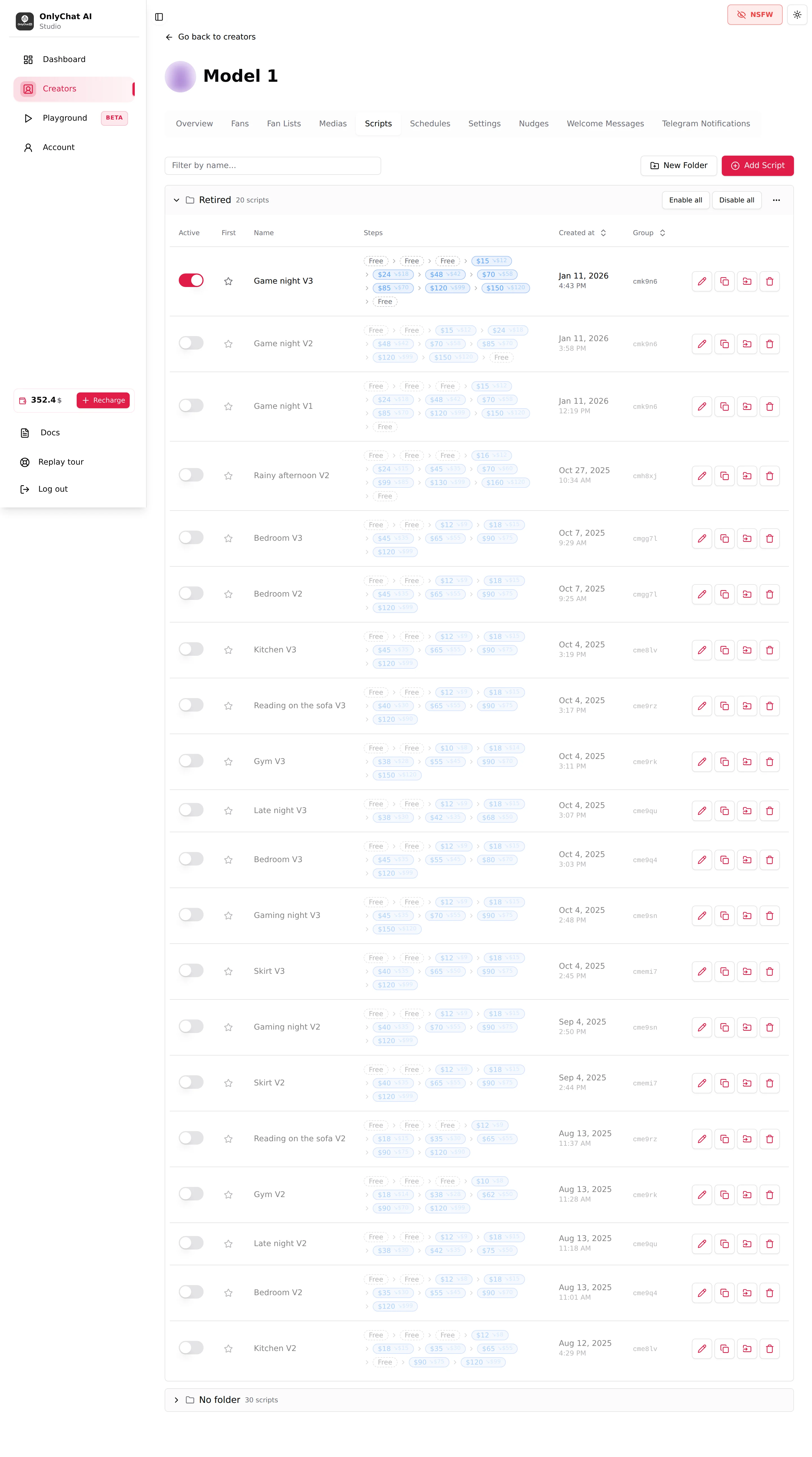
On the Scripts tab, the Steps column shows the whole ladder as chips: "Free" for price 0, the price for a paid step, and the discounted amount as a smaller second value when a discount is enabled. Telegram chips show Stars. A step sold through a Dropp.fans link reads "paid on Dropp".
The ladder
It only climbs
A script starts free and every paid step costs more than the previous one. A fan who paid $24 for step 4 expects step 5 to be worth more, and the AI's teasing between steps ("the next one is the real thing") only holds if the price follows. A price that goes down mid-script tells the fan the earlier one was overpriced. The example above climbs at every step, with the biggest jumps where the content becomes explicit: 15, 24, 48, 70, 85, 120, 150.
Free steps first
Two or three free steps before the first price. One free step is not enough warm-up; four or more and fans drift off before the first sale. The free steps show the scene, the outfit, a first tease. See Media per step.
A low first paid step
The first paid step is where most fans stop: it is the paywall, and the biggest drop of the whole script happens there, not in the free steps. Keep it cheap and soft: a small price ($8 to $15 on OnlyFans, a few hundred Stars on Telegram) for content that is clearly more than the free teasers but far from the finale. Its job is to turn a reader into a buyer; the margin comes later.
Expensive steps at the end
The last two or three steps carry the explicit content and the high prices. Very few fans reach them, so they should each hold one strong media, priced high, rather than a bundle. Writing more than six paid steps rarely pays: the fans who get past the sixth price are a handful.
Reading the numbers
The dashboard's Scripts tab shows, per step, Sent, Paid, Conv. and Rev. Two signals:
- A paid step unlocked by most of the fans who received it is probably underpriced. Test a higher price on the next variation.
- A first paid step that converts far below the free steps' engagement usually means the jump from free to paid is too steep (price, or content that does not deliver more than the teasers).
Compare like with like: the same scene, the same position in the ladder. Two different scripts differ by much more than their prices. See Activate and monitor a script.
Discounts: floors, not starting prices
Enable discount adds a Discounted Price to the step. The field guide describes the mechanism: "When the fan doesn't take this step at its full price, the AI re-offers the same media at the discounted one instead of moving on."
In a conversation with a fan of Model 1, on a step at $48 with a discount at $42:
- The AI sends the step at $48 and presents it.
- The fan says it is too much. The AI defends the price in the creator's voice (this is the Negotiation strategy: "How the AI defends its prices.").
- If the fan still does not buy, the AI comes back with the same media at $42, as a favour.
- The AI does not go below $42. If the fan refuses again, the follow-ups of the step run, then the script continues or times out.
What to set:
| Situation | Discount | Why |
|---|---|---|
| First paid step | On, 15 to 25% below the price | This is where hesitation is highest and where a first purchase changes everything. |
| Middle steps | On, 10 to 20% below | A fallback for the fan who pays every other step. |
| Highest steps | On, 10 to 20% below | A $150 step that closes at $120 is still the best sale of the script. |
| A step you never want to discount | Off | Without a discount, the AI holds the price and moves on. |
How the AI negotiates inside your limits
The AI's price behaviour is set in two places:
- On the step: Price and Discounted Price are hard limits. The AI cannot ask more than the price or accept less than the discount. Without a discount, the price is the only number.
- In Settings, Strategies, Negotiation: "How the AI defends its prices." Default is tuned on real conversations; Custom replaces it with your own instructions (and the interface warns you before switching: "Going Custom replaces it entirely"). Custom instructions can change how the AI argues, how many times it insists, and what it says when it drops to the discount, but they cannot override the numbers on the steps. See Custom strategies.
What the AI does not do: it does not send a later step before the current one, it does not accept a price the fan proposes below the discounted price, and it does not send a paid media for free.
Prices on Telegram
telegram Telegram fans pay in Telegram Stars. The step fields read Price (Stars) and Discounted Price (Stars), with placeholders "e.g. 100" and "e.g. 50". A star chip on the Scripts tab shows the amount in Stars. The dashboard converts Stars to dollars where a dollar figure is shown ("≈ $"), and lets you view Telegram revenue as Stars, Dropp or Total.
Two things differ from OnlyFans:
- Scale. Stars are worth a fraction of a dollar each, so ladders are numbers in the hundreds and thousands (for example 250, 450, 1300, 2400, 3200, 3500, 4800 Stars) rather than tens of dollars. Keep the same logic: climb, cheap first paid step, strong media at the top. See Telegram Stars.
- Dropp.fans links. A step can be sold through a Dropp.fans payment link instead of Stars. The price fields lock ("Free, the fan pays on Dropp.fans instead.") and the price is the one set on Dropp. With Enable discount, a Discount Dropp.fans Link replaces the discounted price: the AI sends the cheaper link instead of re-sending the media at a lower Stars price. See Dropp.fans.
Testing a price
Change one thing at a time. Duplicate the script with Create Variation, keep the same media and messages, change only the prices, activate both, and compare the two rows on the dashboard after a week. If you change the prices, the messages and the media in the same variation, you will not know which one made the difference. See Versions and variations.