
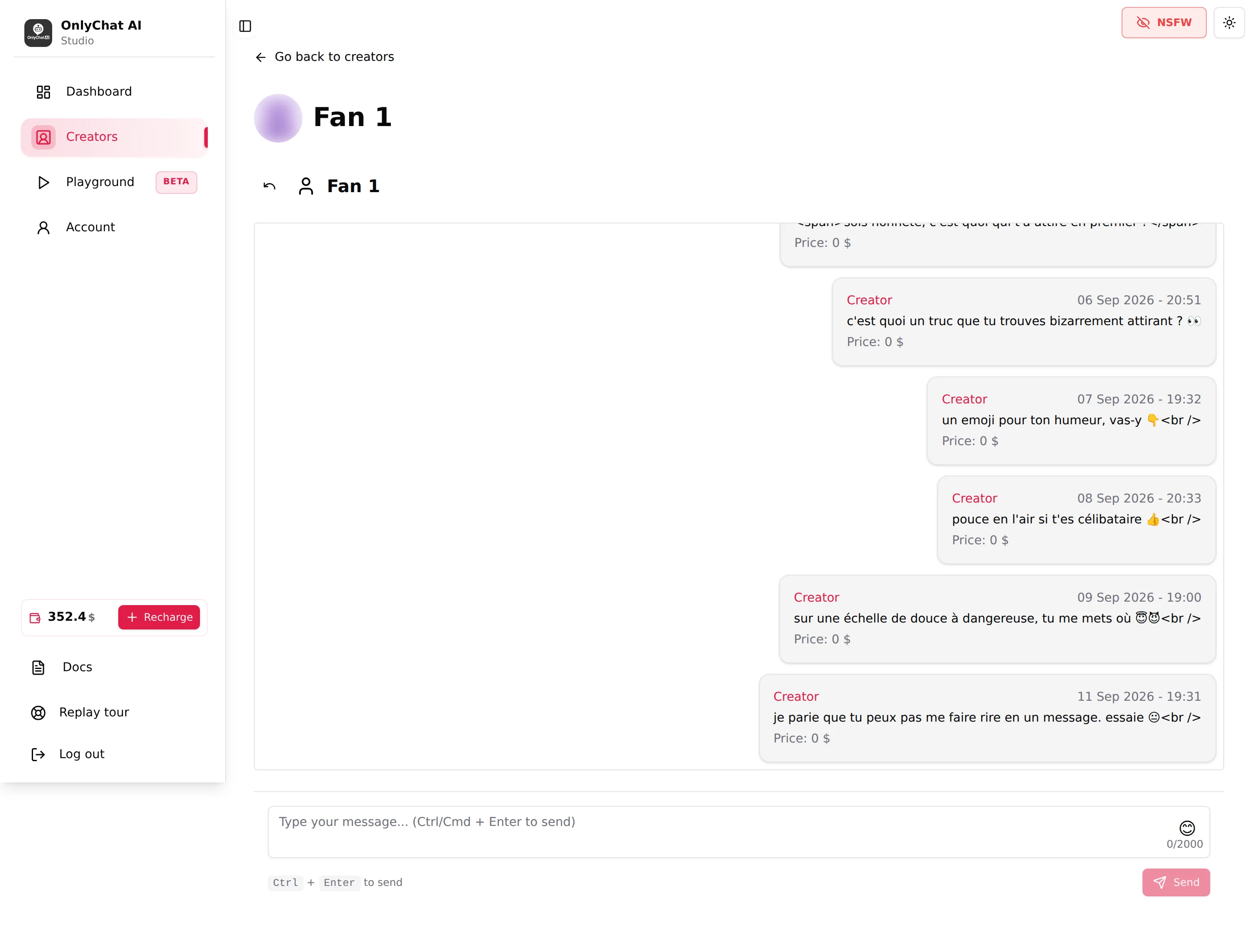
The fan conversation page shows everything exchanged between the creator's account and one fan: the AI's messages, the creator's manual messages and the fan's replies, with timestamps, media counts and prices. It is also where a human can write to the fan from the creator's account without leaving OnlyChat. You open it from the Fans tab, read, and either let the AI continue or take the conversation over for a while.
Where to find it
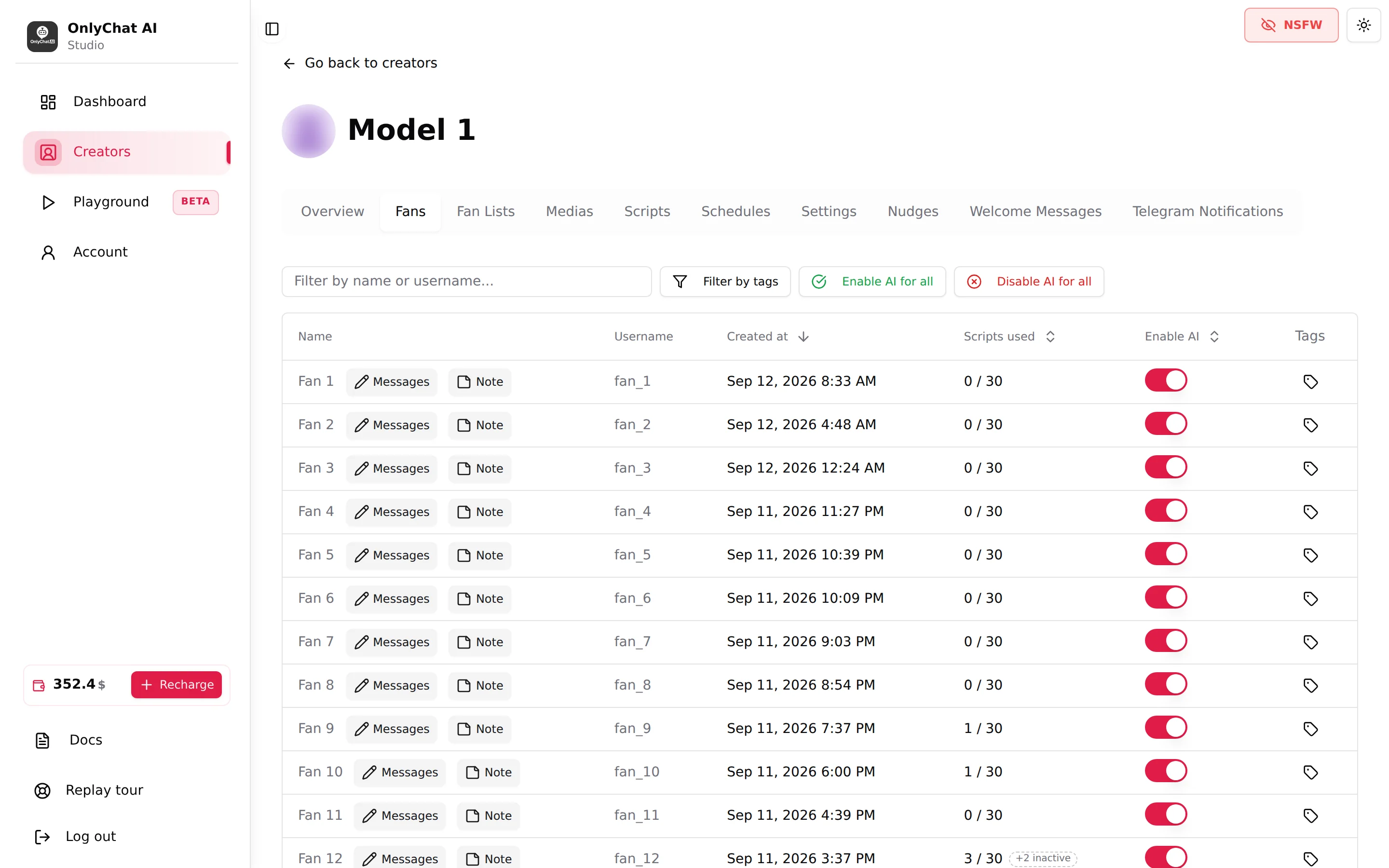
Creator workspace, Fans tab, click a row. The page address is /creators/[creatorId]/follows/fan/[fanId]. The back arrow next to the fan's name returns to the Fans tab.
Opening the page needs the permission "Send messages to fans" for the composer; reading needs "View creators". A member without the right sees "Access Denied. You are not authorized to view messages."
The header
The back arrow and the fan's display name. The guided tour of this page mentions spend, subscription status and an AI switch in the header; these are not shown in the interface today. To pause the AI on this fan, use the Enable AI switch on his row in the Fans tab. To see what he bought, read the prices in the message list or the Recent Sales list of the Dashboard.
The message list
Messages are listed oldest to newest, the newest at the bottom; scroll up to load older ones until "No more messages." appears. Each bubble shows:
| Element | What it means |
|---|---|
| Creator or Fan | Who wrote it. Creator bubbles are on the right. |
| "(sent by" with a robot icon | Appended to Creator messages written by the AI. A Creator message without it was written by a human (from this composer or from OnlyFans). |
| Timestamp "DD MMM YYYY - HH:mm" | When it was sent. |
| Text | The message as sent. Line breaks and formatting from OnlyFans can appear as raw tags. |
| "N media file(s)" | The message carried media. The thumbnails follow the NSFW blur toggle. |
| "Price: N $" | The price attached to the message. "Price: 0 $" is a free message; a paid message shows its PPV price. |
"Failed to load messages." means the page could not fetch the history: reload, and check the sync state of the creator on the board.
Sync last 50 msgs
When the conversation has not been synced yet, a Sync last 50 msgs button appears at the top of the list. It pulls the last 50 messages from OnlyFans so you see the context the AI is working with. Toasts: "Messages synchronized successfully!" or "Failed to sync messages. Please try again." (usually a session problem: check the Synced badge on the card). The button disappears once the conversation is synced. It only feeds this page: the AI does not depend on it, it already reads the fan's thread on OnlyFans when it replies, so an unsynced conversation here does not mean an AI with no context.
The composer
At the bottom: a text area "Type your message... (Ctrl/Cmd + Enter to send)", an emoji button ("Add emoji"), a counter "n/2000", the hint "Ctrl + Enter to send" and the Send button.
- Decide whether the AI stays onTo add one message while the AI keeps handling the fan, leave the AI on: it reads your message as its own and carries on. To take the conversation over completely, go back to the Fans tab and switch Enable AI off for this fan first, otherwise it keeps replying alongside you.
- WriteType in the text area. The counter shows the length, up to 2000 characters. Click the emoji icon to open the picker and insert an emoji at the cursor.
- SendPress Ctrl + Enter (or Cmd + Enter on Mac) or click Send. The button reads "Sending..." then the toast "Message sent successfully!" appears and the bubble shows as Creator, without the robot mark.
"Failed to send message. Please try again." means OnlyFans refused or the session is invalid. Check the sync badge on the card; re-sync from the extension if needed.
When to write yourself, and when to let the AI work
The AI is better than a tired human at the routine: small talk, KYC questions, launching a script, defending a price, following up. It is not the right tool when the fan asks for something outside the scripts or when emotions run high.
| Let the AI continue | Take over |
|---|---|
| The fan is chatting, flirting, asking about the creator's day | The fan asks for a custom, a video call, a meeting, a price for something that is not a step |
| The fan is negotiating a step price | The fan mentions a refund, a dispute, or the platform's rules |
| The fan went quiet (the follow-up delay handles it) | The fan says something the AI must not answer (a personal matter, a legal matter) |
| The fan wants "more" after a script (cooldowns handle the pace) | The creator wants to send a personal message or a manual PPV |
How to take over cleanly:
- Fans tab, switch Enable AI off for this fan. The AI stops answering him; other fans are unaffected.
- Write from the composer (or from OnlyFans if you need to attach media or a price).
- When the matter is closed, switch Enable AI back on. The AI reads the whole history, including your messages, and continues from there.
Sales you close by hand count in Revenue (7d) but not in AI revenue. They are not commissioned only if the AI had been off for that fan for more than 30 minutes; a sale made while the AI is chatting, or in the 30 minutes after switching it off, is commissioned (anti-fraud rule, OnlyFans only; on Telegram a PPV you send by hand always carries commission, 15% or 4%, since it still leaves through the bot, see Plans and commission).
Fan notes and tags
With a Premium license, the Fans tab row also has Note and Tags buttons. A note ("Personal Info", placeholder "Add personal notes about this fan...") is read by the AI and is the right place to record what you learned during a manual exchange (his name, his job, what he asked for) so the AI uses it afterwards. Tags are for you: "Tags are yours, the AI doesn't read them." See Fan notes and Tags.
Good to know
- A fan appears in the Fans tab only once the AI has crossed paths with him. A fan who wrote while the AI was off, and whom nobody answered, may not be listed yet.
- The fan's messages are read through the synced session. If the badge on the card is Sync error, the list stops updating and the composer fails.
- On Telegram the conversation page is read-only (no composer) and has a Fan note card instead; the creator replies from their own Telegram app. See Fans on Telegram.
- The NSFW toggle blurs media thumbnails here as everywhere else.