
An OnlyFans license is the monthly right to run the AI on one OnlyFans creator. There are two kinds: Basic at $20/month per creator, and Premium at $70/month per creator, both with a 10% commission on what the AI sells. You buy licenses into a stock on the Account page, assign one to a creator from its card, and choose whether it renews itself from your balance. A Basic license can be upgraded to Premium in place for the remaining days. Telegram licenses are a separate pool with their own price and are covered in Assign a Telegram license.
Where to find it
- Buy: Account, Balance & Licenses tab, Buy Licenses button. The Licenses cards on the same tab show the stock and who holds what.
- Assign: Creators board, Assign License button on a card without an active license.
- Renew: the Renew switch on the card, once a license is assigned.
- Upgrade: any Premium tab of the creator (Nudges, Welcome Messages, Telegram Notifications) shows Upgrade to Premium when the license is Basic.
Basic versus Premium
| Basic | Premium | |
|---|---|---|
| Price | $20/month per creator | $70/month per creator |
| Commission | 10% of AI net revenue | 10% of AI net revenue |
| Overview, Fans, Fan Lists, Medias, Scripts, Schedules, Settings | Yes | Yes |
| Fan conversation and composer | Yes | Yes |
| Nudges (re-engage fans when they come back online) | Locked | Yes |
| Welcome Messages (sequences for new subscribers) | Locked | Yes |
| Fan notes (personal info the AI reads) and Tags | Locked | Yes |
| Telegram Notifications (sales, AI disabled, no script left, keywords) | Locked | Yes |
| Shown on the card | no badge | Premium badge |
The tour sums it up: "Nudges, welcome messages, fan tags and Telegram alerts come with Premium. Upgrading applies to this creator's current license." Start on Basic if the creator has few fans and you are still building scripts; move to Premium once the AI sells and you want to work the fan base (nudges, welcome sequences, notes). See Premium overview.
Commission is charged only on revenue the AI generates. "AI net revenue" is defined in Plans and commission.
The Licenses cards
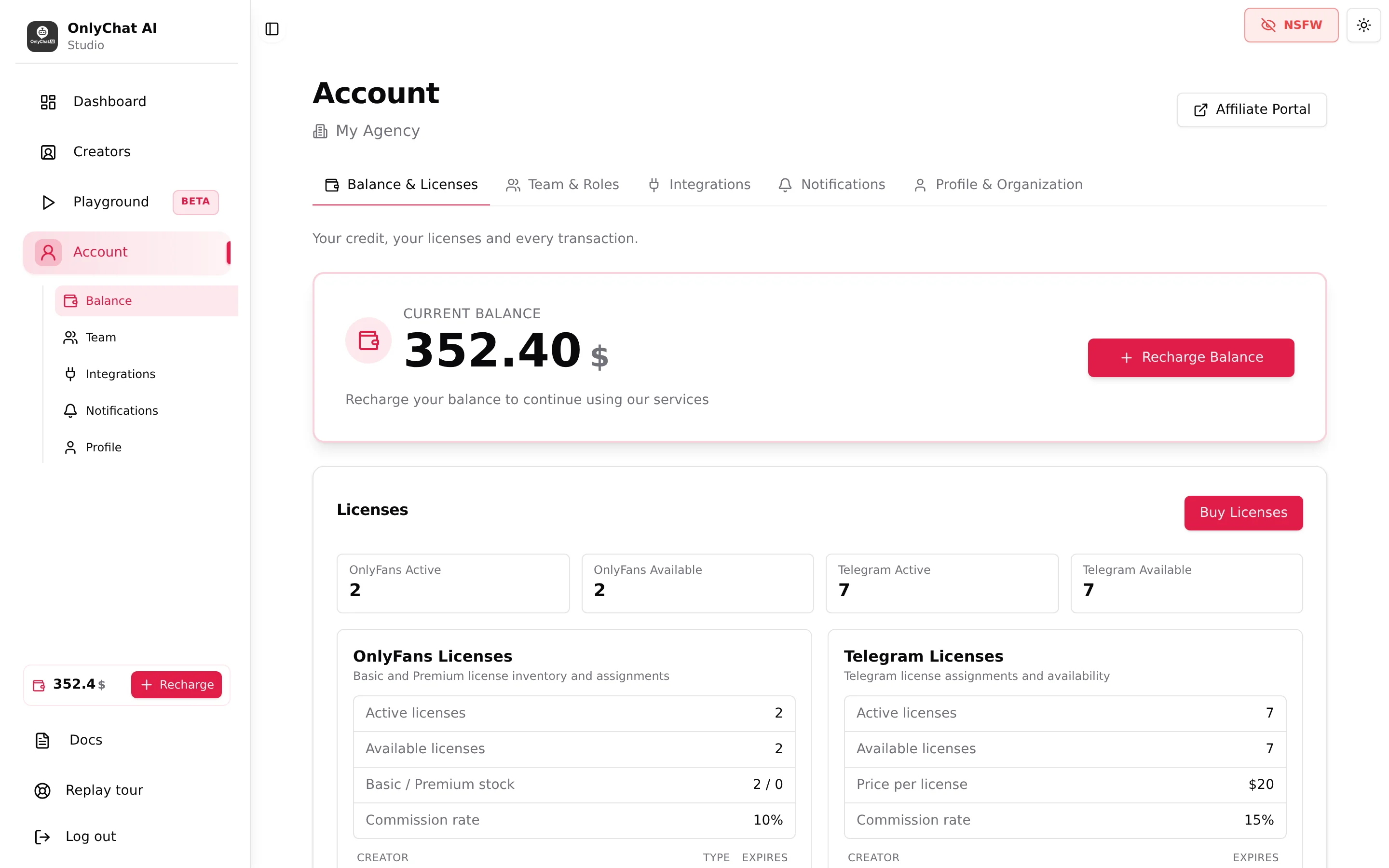
Account, Balance & Licenses shows four summary chips (OnlyFans Active, OnlyFans Available, Telegram Active, Telegram Available) and two cards.
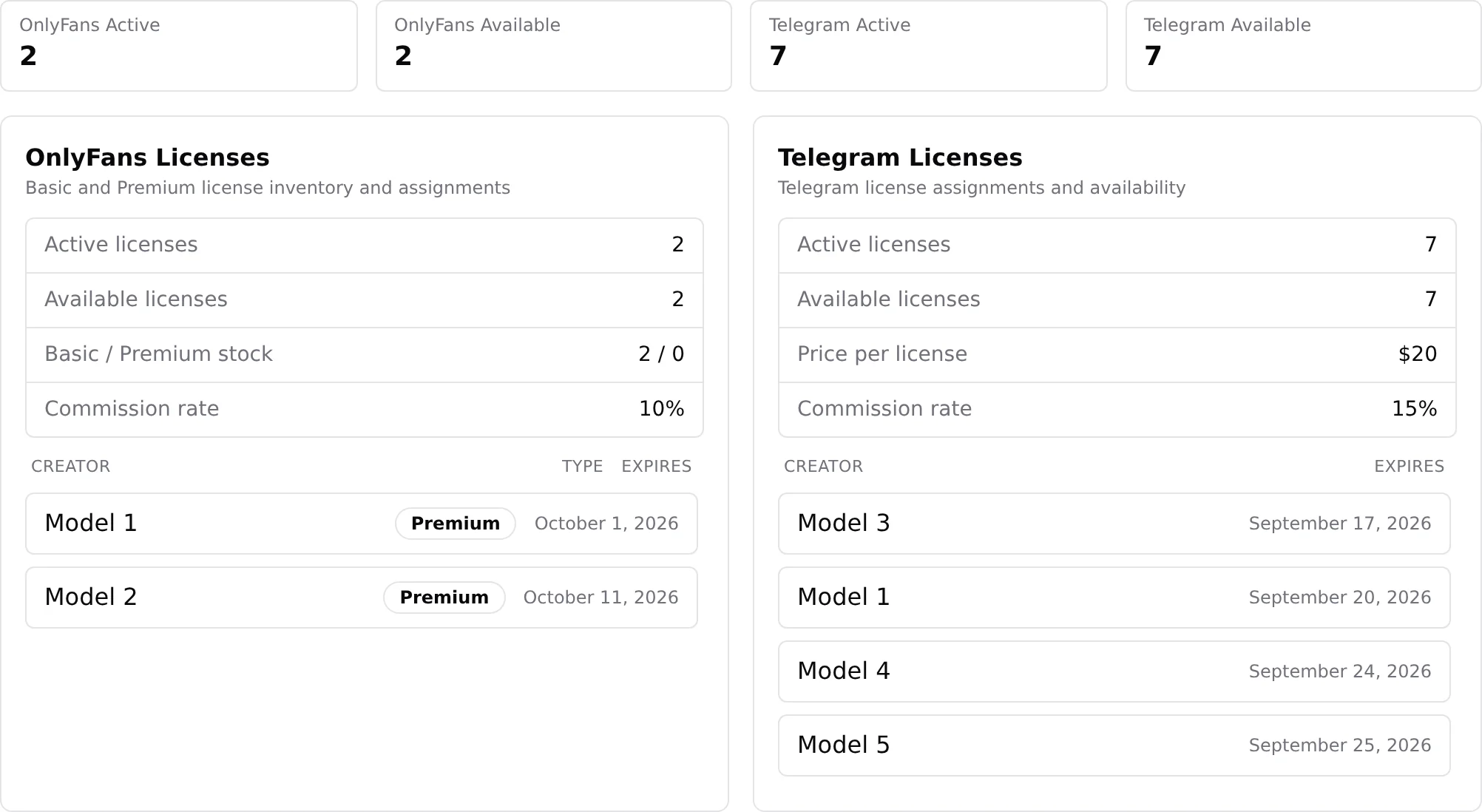
The OnlyFans Licenses card ("Basic and Premium license inventory and assignments") lists:
| Line | Meaning |
|---|---|
| Active licenses | Licenses assigned to a creator and still valid. |
| Available licenses | Bought, not assigned. Your stock. |
| Basic / Premium stock | The split of the available stock, "2 / 0" for two Basic and no Premium. |
| Commission rate | 10%. |
| Table Creator · Type · Expires | One row per active license: which creator, Basic or Premium, expiry date. "Unknown Creator" appears when the creator was deleted. "No active OnlyFans licenses." when empty. |
The same counts appear on the Creators board as chips ("2 active · 2 available") with the tooltip "OnlyFans licenses: N assigned to a creator and still valid, N basic and N premium waiting to be assigned. Click to manage them on the Account page."
Buy licenses
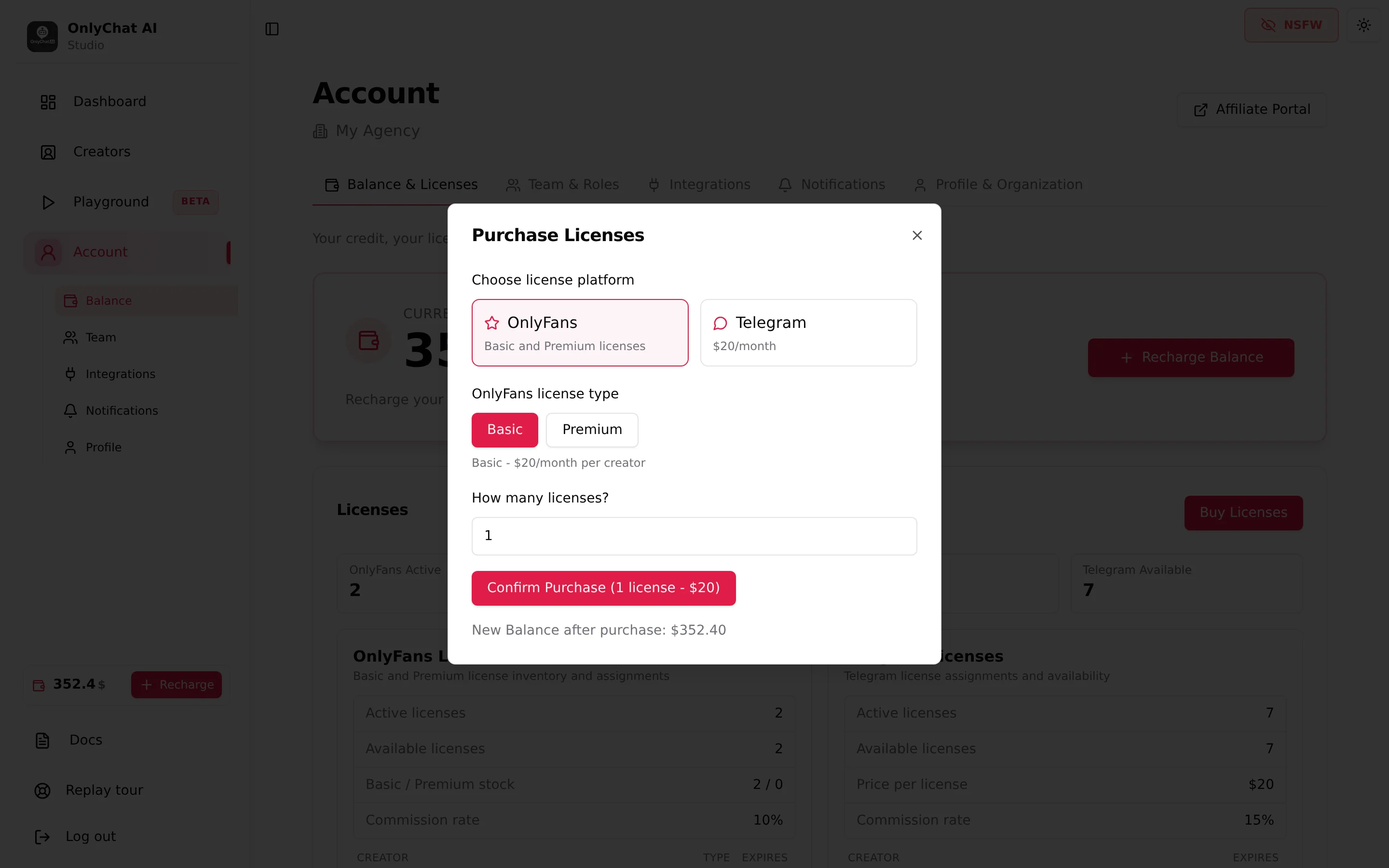
- Open the modalAccount, Balance & Licenses, Buy Licenses. Needs the permission "Buy licenses".
- Choose license platformOnlyFans ("Basic and Premium licenses"). The Telegram option ("$20/month") is for Telegram creators only.
- OnlyFans license typeBasic ("Basic - $20/month per creator") or Premium ("Premium - $70/month per creator"). The type is fixed at purchase; a Basic license in stock can only become Premium once assigned, through the upgrade.
- How many licenses?Enter the quantity. The button updates: "Confirm Purchase (N license(s) - $X)".
- Check the balance line"New Balance after purchase: $Y". It turns red if the purchase would take the balance below zero: recharge first.
- Confirm PurchaseToast "Licenses purchased successfully." The licenses land in Available. Error: "Failed to purchase licenses."
The purchase is deducted from your balance immediately and appears in Transaction History as "OnlyFans license purchase (N basic|premium)". A license in stock does not run: the month starts when you assign it.
Assign a license
- Find the cardCreators board. A creator without an active license shows the status "No active license", the hint "Assign a license to start" and the Assign License button. Needs the permission "Assign license to creator".
- Pick the typeThe modal "Assign License to [name]" says "Select which type of license to assign:" with a select "Select license type" listing "Basic (N available)" and "Premium (N available)". The counts tell you what is in stock.
- ConfirmThe card switches to "Ready to launch" with "Flip the AI toggle to go live". The Renew and AI switches appear. The expiry is one month from now, shown as "License until MMM D, YYYY" once the AI is on, and in the Creator health card as "Premium|Standard · expires MMM D".
No Available Licenses
If the stock is empty the modal shows "No Available Licenses. You don't have any available licenses. Please purchase one from the Account page." with an OK button. Buy one, then assign.
The Renew switch
On the card, next to the AI switch, once a license is assigned. Tooltip: "On, this license is bought again from your balance when it expires. Off, the creator goes offline on the expiry date." Needs the permission "Toggle auto-renew".

| Renew | On the expiry date | Risk |
|---|---|---|
| On | The same type of license is bought from your balance and the creator keeps running. The Overview shows an Auto-renew badge. The purchase appears in Transaction History. | If the balance cannot cover it, the renewal fails and the creator goes offline. Keep the balance above your monthly total and set a balance alert. |
| Off | The license expires, the card returns to "No active license", the AI stops. | A creator you forgot to renew by hand stops selling silently. Watch the Expires column weekly. |
For a creator you are winding down, switch Renew off a few days before the expiry and let it lapse.
Upgrade a Basic license to Premium
You do not need to wait for the renewal. Open any Premium tab of the creator (Nudges, Welcome Messages, Telegram Notifications). With a Basic license the tab shows the card "Premium Feature Locked. [Feature] is only available with a Premium license. Upgrade this creator's license to unlock this feature." and the button Upgrade to Premium.
- Open the modalUpgrade to Premium opens "Upgrade License to Premium. Upgrade this license from Basic to Premium for the remaining duration."
- Read the three lines"Remaining days: N days", "Pro-rata cost: $" (the Basic-to-Premium price difference, spread over the remaining days only), "Current balance: $".
- Confirm UpgradeToast "License upgraded to premium successfully." The card shows the Premium badge, the Premium tabs unlock at once, and the expiry date does not move. Which type is bought at the next renewal after an upgrade is not shown in the interface: check Transaction History after the first renewal.
Errors: "Insufficient balance. Please add funds to your account." (recharge first) and "Failed to upgrade license." (retry; contact the team if it persists). A member without the "View balance" permission sees "Permission Required. You don't have permission to view the organization balance. Upgrading licenses requires balance visibility": ask an owner or admin to upgrade, or to grant the permission.
A downgrade from Premium to Basic is not shown in the interface. To go back to Basic, switch Renew off, let the Premium license expire, then assign a Basic one.
Good to know
- Assigning does not turn the AI on. See Turn the AI on.
- A creator whose license expires keeps its scripts, media, fans and settings. Assign a new license and everything resumes.
- Telegram licenses are a separate pool ("Telegram and OnlyFans licenses are separate pools."), $20/month, 15% commission, with bulk packs. An OnlyFans license cannot be assigned to a Telegram creator.
- Purchases and renewals are listed on Account, Balance & Licenses, Transaction History.
- Permissions involved: "Buy licenses", "Assign license to creator", "Toggle auto-renew", "View balance". See Members and roles.