
OnlyChat is prepaid: you recharge a balance in crypto, licenses are bought from that balance, and the commission on AI sales is taken from it too. Almost every payment problem falls into four cases: the invoice is still "Waiting for payment", the invoice expired before you paid, you sent the wrong asset or the wrong network, or the balance went negative and the AI stopped. This page also covers OnlyVault top-ups, which use a separate balance.
Where to look
Account, Balance & Licenses: the "Current Balance" card, the license cards and the "Transaction History" table.

Transaction History lists every movement with date, type and amount: recharges, "OnlyFans license purchase (N basic|premium)", "Telegram license purchase (N)", renewals. "No transactions found." means nothing has been recorded yet.
The recharge flow, and where it breaks
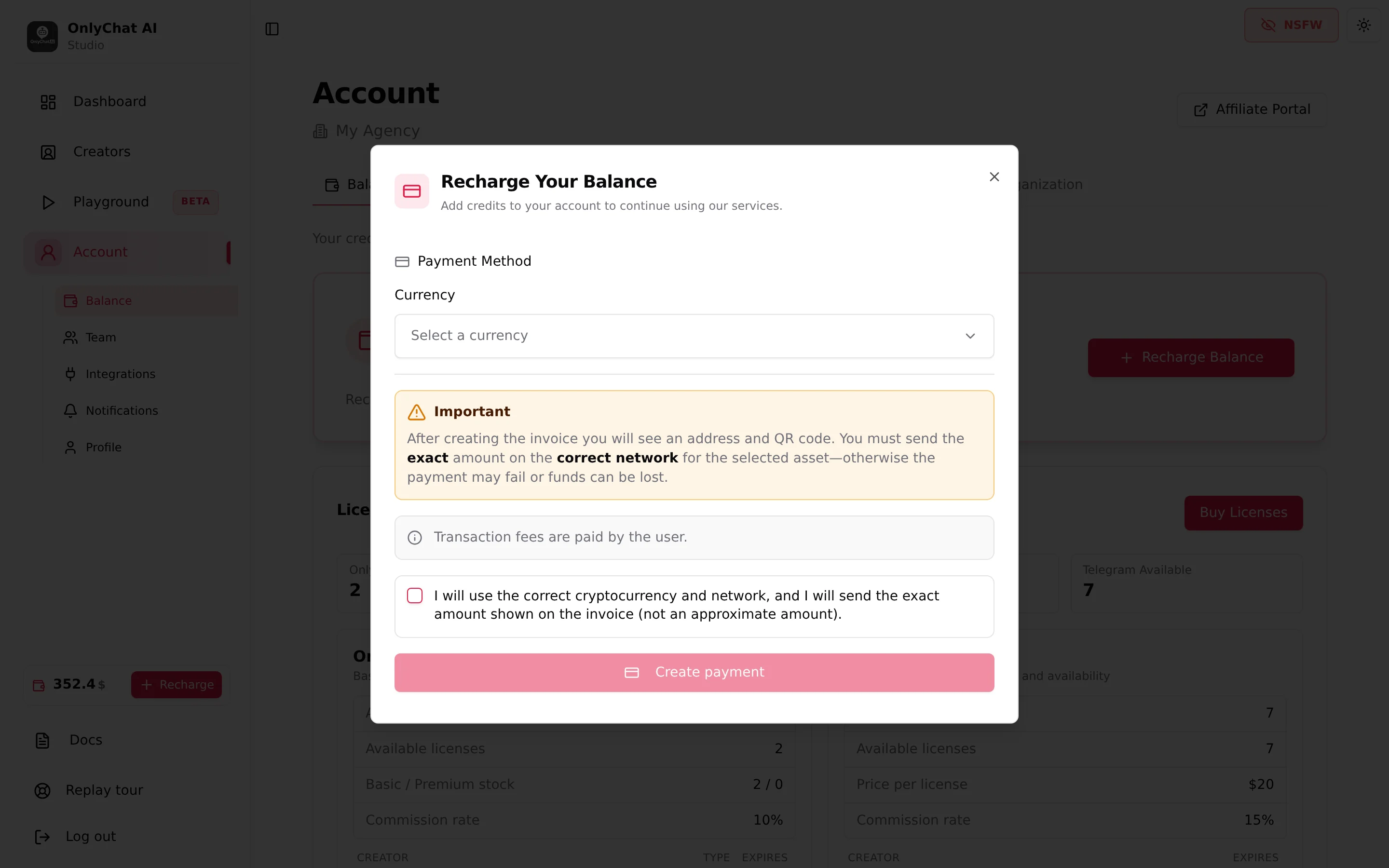
Step 1, "Payment Method": choose a Currency ("Select a currency", with a search), enter the Amount in USD (or "Amount in ASSET", with "Minimum: N"), read the "Important" box ("After creating the invoice you will see an address and QR code. You must send the exact amount on the correct network for the selected asset, otherwise the payment may fail or funds can be lost." and "Transaction fees are paid by the user."), tick "I will use the correct cryptocurrency and network, and I will send the exact amount shown on the invoice (not an approximate amount)." and click Create payment.
Errors at this step: "Please confirm the checkbox: correct network, asset, and exact invoice amount.", "Please enter an amount greater than N ASSET.", "Error while creating the payment" (retry, or try another currency).
Step 2, "Invoice ready, send crypto from your wallet.": "Amount to send", "Receiving Address" (copy, "Address copied!"), a QR code and the network shown in your wallet. The status tracker then moves through: Waiting for payment, Confirming, Confirmed, Sending in progress, Partial payment received, Payment completed ("Credits recharged successfully!"), or Payment failed, Payment refunded, Payment expired.
Case 1: the invoice stays on "Waiting for payment"
| Check | What it means |
|---|---|
| Your wallet shows the transaction as sent | The network is confirming; "Confirming" appears after the first confirmations. Some networks take minutes |
| The wallet shows nothing sent | The transfer never left. Send it, the invoice is still valid |
| You sent to a different address than the one on the invoice | The funds are not on this invoice; see case 3 |
| The status reads "Partial payment received" | You sent less than the invoice amount, often because the wallet deducted its fee from the amount. Send the difference to the same address while the invoice is open |
Keep the modal open, or come back to Account later: the balance updates when the payment completes.
Case 2: the invoice expired
"Payment expired" means the invoice closed before a full payment was detected.
- If you did not send anything: create a new invoice with Recharge Balance and pay it within its window.
- If you sent after expiry, or the transfer confirmed after expiry: the funds reached the address but are not credited automatically. Contact the team with the transaction hash, the asset, the network, the amount and the time.
Case 3: wrong asset or wrong network
The modal warns: "Wrong asset or chain often means lost funds." If you selected USDT on one network and sent USDT on another, or sent a different coin, the payment processor does not see it.
- Do not send again. Note the transaction hash, the asset, the network, the amount, the destination address and the time.
- Contact the team with those details. Recovery depends on the network and is not guaranteed.
- Next time, match the network shown in the invoice with the network selected in your wallet before confirming.
Case 4: the balance is zero or negative
The AI needs a positive balance. When it is not, several things happen at once:
- Flipping AI on returns "Insufficient Balance. You need a positive balance to enable AI for this creator."
- Licenses with Renew on cannot be bought again at expiry; the creator goes offline on the expiry date.
- Buying licenses shows "New Balance after purchase: $Y" in red when it would go negative; upgrading to Premium returns "Insufficient balance. Please add funds to your account."
Recharge, then flip the AI back on for each creator: it does not come back on its own. To avoid it, set Account, Notifications, "Receive email alerts" with an "Alert threshold ($)". See Low balance alerts.
A license did not renew
- Renew was off on the card: "Off, the creator goes offline on the expiry date." Assign a license from the available pool (Account, Buy Licenses if the pool is empty).
- Renew was on but the balance was too low at expiry: recharge, then assign a license.
- Telegram and OnlyFans pools are separate: "Telegram licenses are separate from OF licenses". Having Telegram licenses available does not renew an OnlyFans creator.
- Prices: OnlyFans Basic $20/month per creator, Premium $70/month, Telegram $20/month; commission 10% (OnlyFans) or 15% (Telegram) on what the AI sells. See Plans and commission.
"Permission Required" when recharging or upgrading
Members without the "View balance" and "Recharge balance" permissions do not see the balance widget and cannot recharge. Upgrading a license shows "Permission Required. You don't have permission to view the organization balance. Upgrading licenses requires balance visibility". Ask the owner to change the member's permissions in Account, Team & Roles. See Members and roles.
OnlyVault top-ups
OnlyVault has its own credits and its own crypto invoice (USDC or USDT). Common issues:
- "Please verify your email address first..." on Pay with crypto: click the link in the "Verify your OnlyVault email" message; there is no resend button, contact the team if the email is lost.
- "Minimum $10" or "Top-up too large" (over $10,000): adjust the amount.
- "No payment URL returned": the browser blocked the new tab; allow pop-ups and retry.
- A payment under 97% of the invoice stays "partially_paid" and is credited by the team only.
- The app polls for 30 minutes after Pay with crypto; reload later if the balance did not refresh.
See Credits and billing.
Good to know
- In the interface, both tools take crypto only. On OnlyChat, a bank transfer (from 90 EUR, with invoice) goes through the official payment bot on Telegram, which credits your balance automatically when the transfer arrives, see Pay by bank transfer; card payment is on request for larger agencies. OnlyVault: crypto only.
- Wallet network fees are yours; add them on top so the received amount matches the invoice.
- The invoice description reads "OF Credits Recharge" on your wallet side, whatever the platform you use the balance for.
- Playground credits ($3 per 100, 1 credit per message, OnlyFans only) are a separate purchase and are not part of the balance.