
Welcome messages are the messages a new subscriber receives automatically after subscribing to the creator's OnlyFans page. You define a sequence (text, media, or both, each with its own delay) and the AI sends it from the creator's account as soon as someone subscribes. The feature exists because the first minutes after a subscription are when a fan is most curious and most likely to reply: a greeting that arrives on its own, followed by a second and third message spaced out over hours, turns a silent subscriber into a conversation the AI can then run.
Where to find it
Open the creator's workspace and click the Welcome Messages tab. The card header reads "Welcome Messages, Automatically send messages to new subscribers", with the note "The first message will be sent after its configured delay + a random time between 0-3 minutes".
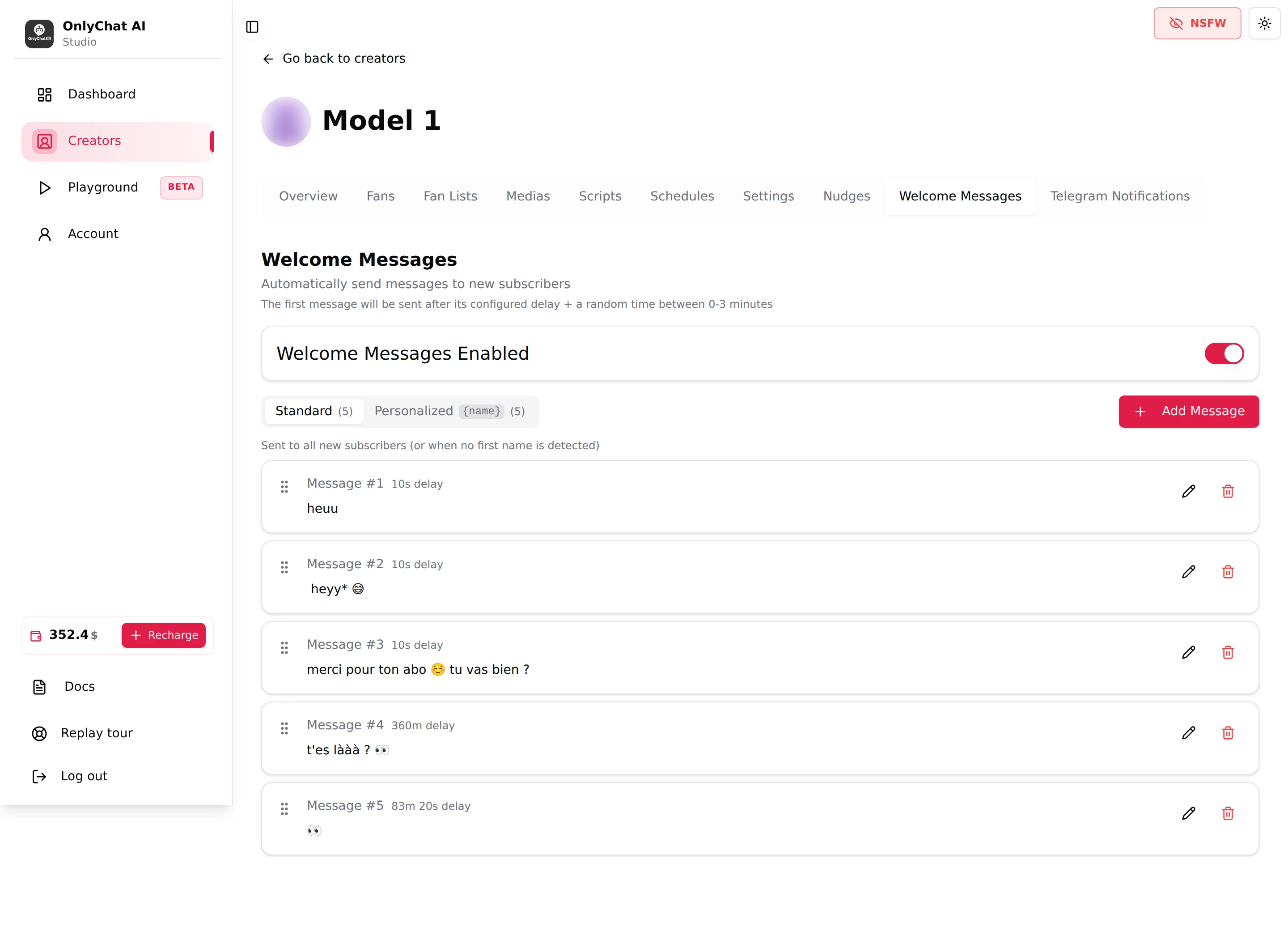
Welcome Messages Enabled
Switch in the first card. When it is off, nothing is sent to new subscribers, even if both sequences are full. When it is on, every new subscription triggers the sequence. It is the one thing to switch off when you want to pause welcome messages without deleting your work, for example during a promotion where you greet new fans yourself.
The two sequences
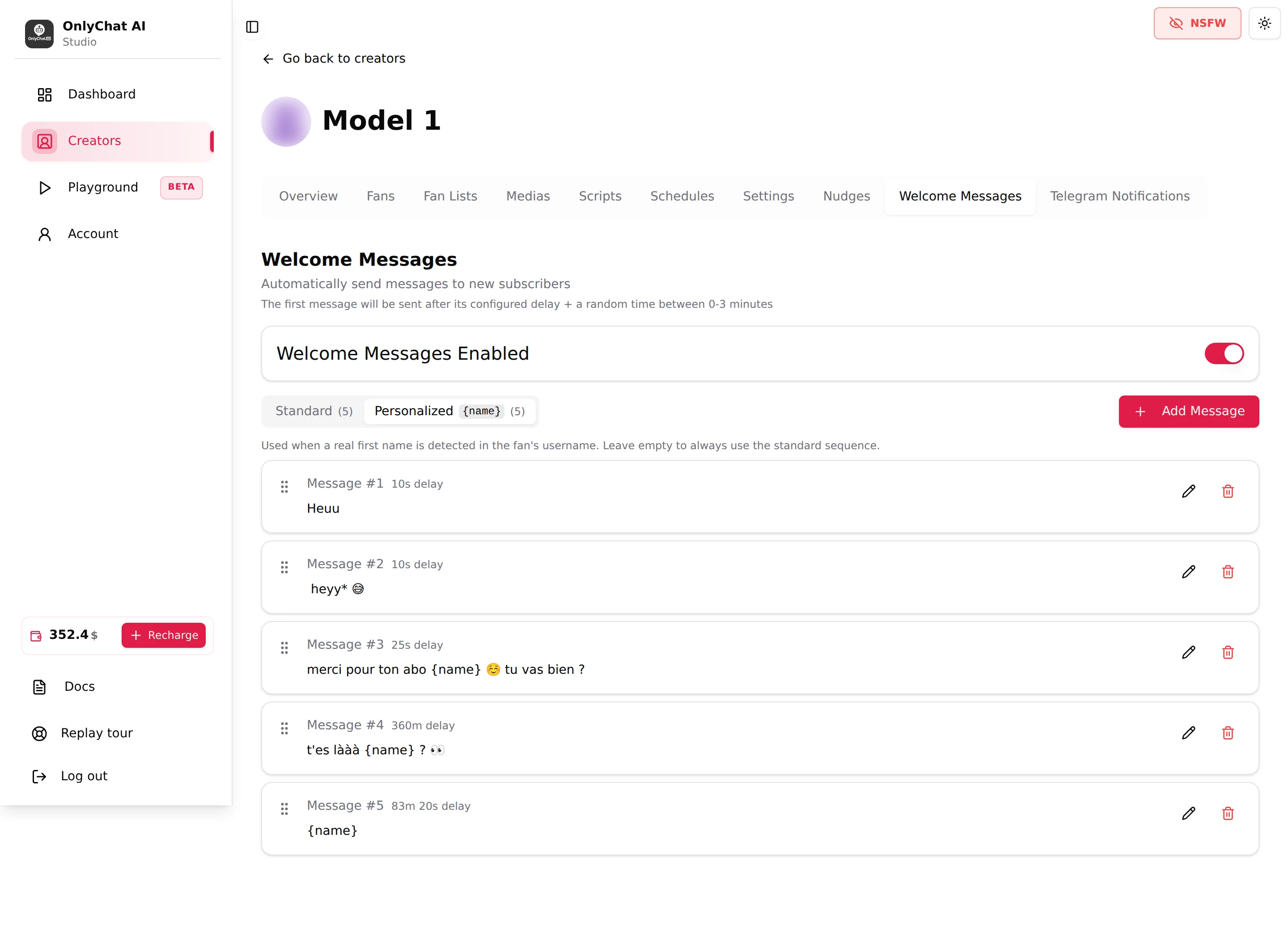
The tab under the switch has two entries, each with the number of messages it contains, for example Standard (5) and Personalized {name} (5).
| Sequence | Sent when | Text |
|---|---|---|
| Standard | "Sent to all new subscribers (or when no first name is detected)" | Written for a fan whose name you do not know. |
| Personalized | "Used when a real first name is detected in the fan's username. Leave empty to always use the standard sequence." | Can contain {name}, replaced by the detected first name. |
How the choice works in a real subscription: the fan subscribes, OnlyChat looks at the username. If a real first name is detected and the Personalized sequence has at least one message, the fan gets the Personalized sequence. Otherwise the fan gets the Standard sequence. A fan never receives both.
Two guards protect the logic:
- "You must create at least one standard welcome message first": the Personalized sequence cannot exist without a Standard fallback.
- "Cannot delete the last standard message while personalized messages exist": delete or empty the Personalized sequence before removing the last Standard message.
One message in the sequence
Each row shows Message #n, the delay badge ("10s delay", "6m 0s delay", "360m delay" for six hours), the text or the label Media only message, and Medias (N) when media are attached. Three controls per row:
- The drag handle on the left ("Drag to reorder message"). Order is the send order; drop a row higher to send it earlier.
- The pencil opens Edit Welcome Message, "Modify the message text and delay".
- The trash asks "Are you sure you want to delete this welcome message?" and shows "Welcome message deleted!".
An empty sequence shows "No messages configured for this sequence." A loading error shows "Failed to load welcome messages."
Add Message
The button opens Add Welcome Message, "Create a new message to automatically send to new subscribers". From the Personalized tab, it opens Add Personalized Welcome Message, "Create a personalized message for fans with a detectable first name. Use {name} to insert the fan's first name."
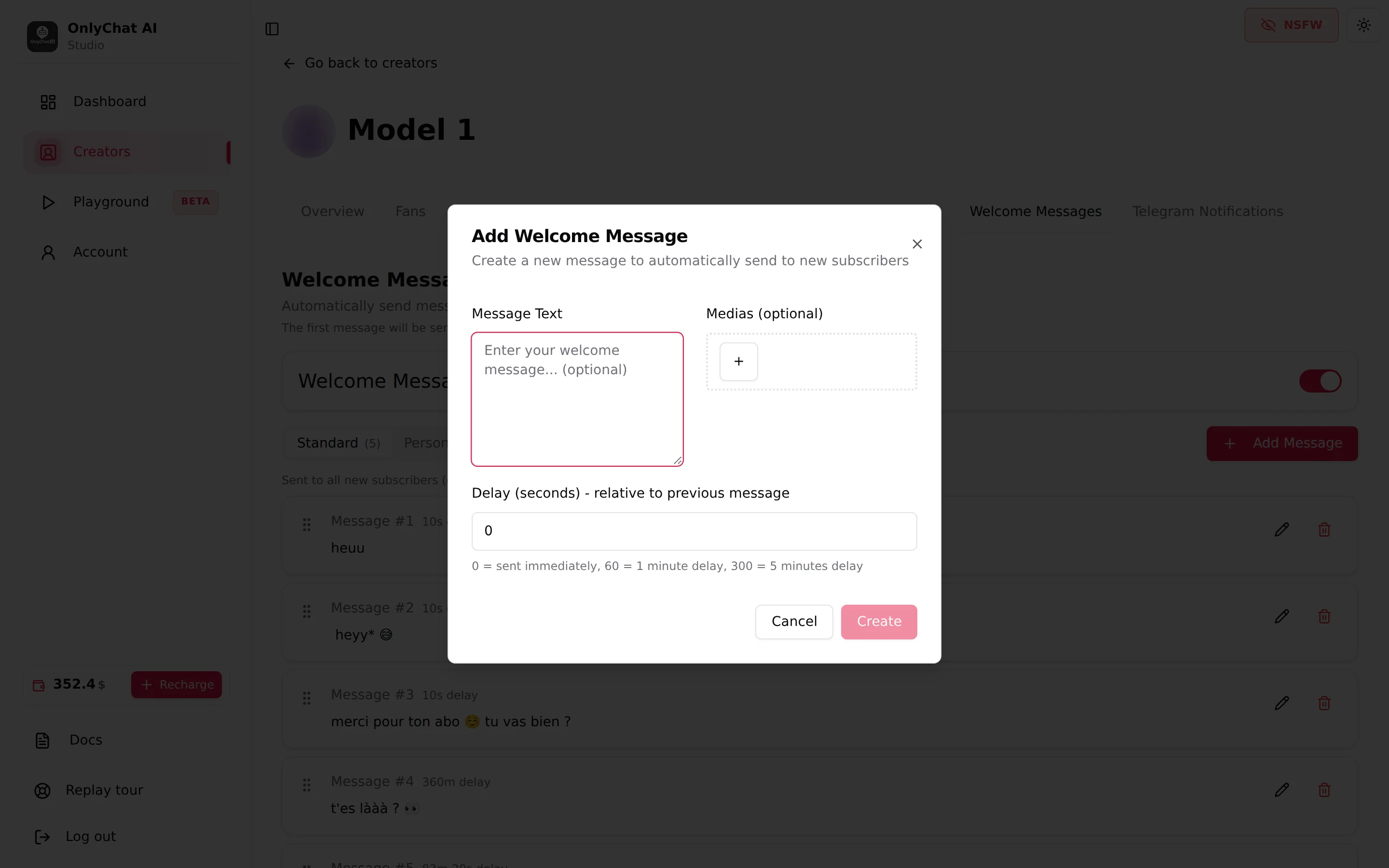
Message Text
Placeholder "Enter your welcome message... (optional)" on the Standard side, "Hi {name}! Welcome to my page..." on the Personalized side, with the hint "Use {name} to insert the detected first name of the fan." The text is sent exactly as written: it is not rewritten by the AI, not translated, not adapted to the fan. Write it in the creator's voice and in the language of the page. Emoji are allowed here since it is a message to fans, not a setting.
Leave it empty for a media-only message. The validation "Please provide either message text or select media files" blocks a message that has neither.
Medias (optional)
Opens the picker Select Medias, "Choose media files from your creator's library to add to this welcome message." The library is the creator's synced vault, see Media library: a media has to be synced before it can be attached. A welcome message is free content, there is no price field. Use it for a short teaser (a photo, a few seconds of video) that makes the fan open the conversation, not for something you sell later in a script.
Delay (seconds), relative to previous message
Helper "0 = sent immediately, 60 = 1 minute delay, 300 = 5 minutes delay". The delay is counted from the previous message of the sequence, not from the subscription. For the first message, the note at the top applies: its delay plus a random 0 to 3 minutes, so two fans who subscribe at the same second do not get the greeting at the same second.
A sequence that works in practice:
| # | Delay | Content |
|---|---|---|
| 1 | 10 | Short greeting, one line |
| 2 | 10 | A second line that asks a question |
| 3 | 60 | Media only: one teaser photo |
| 4 | 21600 (6 hours) | A follow-up for fans who did not answer |
| 5 | 86400 (24 hours) | Last follow-up |
Create the sequence
- Open Welcome Messages and stay on StandardAdd the Standard messages first; the Personalized sequence refuses to exist without at least one Standard message.
- Click Add Message and fill the formText, optional media, delay in seconds. Click Create. The toast "Welcome message created!" confirms and the message appears at the end of the list.
- Repeat and reorderAdd the follow-ups, then drag rows to fix the order. Check the delay badges read from top to bottom the way you want them sent.
- Add the Personalized variantsSwitch to the Personalized tab and rebuild the same sequence with
{name}in the text. Keep the same delays so both kinds of subscriber get the same rhythm. - Turn Welcome Messages Enabled onUntil the switch is on, nothing is sent. Once it is, the next subscriber gets the sequence.
Good to know
- New subscribers only. The sequence fires on a brand-new subscription. A former subscriber who comes back does not get it again: the AI treats the return as a normal conversation and picks up from the fan's memory, see Fan notes.
- Media must be synced first. The picker only shows media from the creator's Medias tab. If it is empty, sync the vault list you need.
- Media descriptions do not matter here: the welcome media is sent as-is, the AI does not choose it. Descriptions matter for scripts, not for this tab.
- Editing a sequence in progress works like updating a script: a fan halfway through keeps his place, the messages he has not received yet go out in their edited version, and a message that was already being sent goes out as it was.
- AI switch and license. Welcome messages are sent by the AI from the creator's account: the creator needs an active Premium license and the AI switch on. When the AI is off (manually or by a schedule), nothing is sent; what happens to a sequence that was in progress when the AI went off is not shown in the interface.
- Telegram creators have no Welcome Messages tab. On Telegram, the first exchange is handled by the AI when the fan writes, see Fans on Telegram.
- Permissions: the tab is visible with the creator tab permissions of your role; a Basic creator shows the locked card whatever the permissions.