
The MCP server lets an AI assistant work directly on your OnlyChat account. MCP (Model Context Protocol) is the standard that assistants like Claude, ChatGPT, Codex and Cursor use to plug into an outside tool. You give the assistant one address and one key, and it can then list your creators, read your scripts, fans and stats, and, if you let it, create and change scripts, folders and media, all from a normal conversation.
There is nothing to install. Everything happens in two places: you create a key on the API Keys page of your account, and you paste that key plus the server address into your assistant.
Where it lives
Account, tab API Keys ("Keys that let your AI agents use OnlyChat through the MCP server."). The page lists your keys, lets you create new ones, and shows the server address to give your agent.
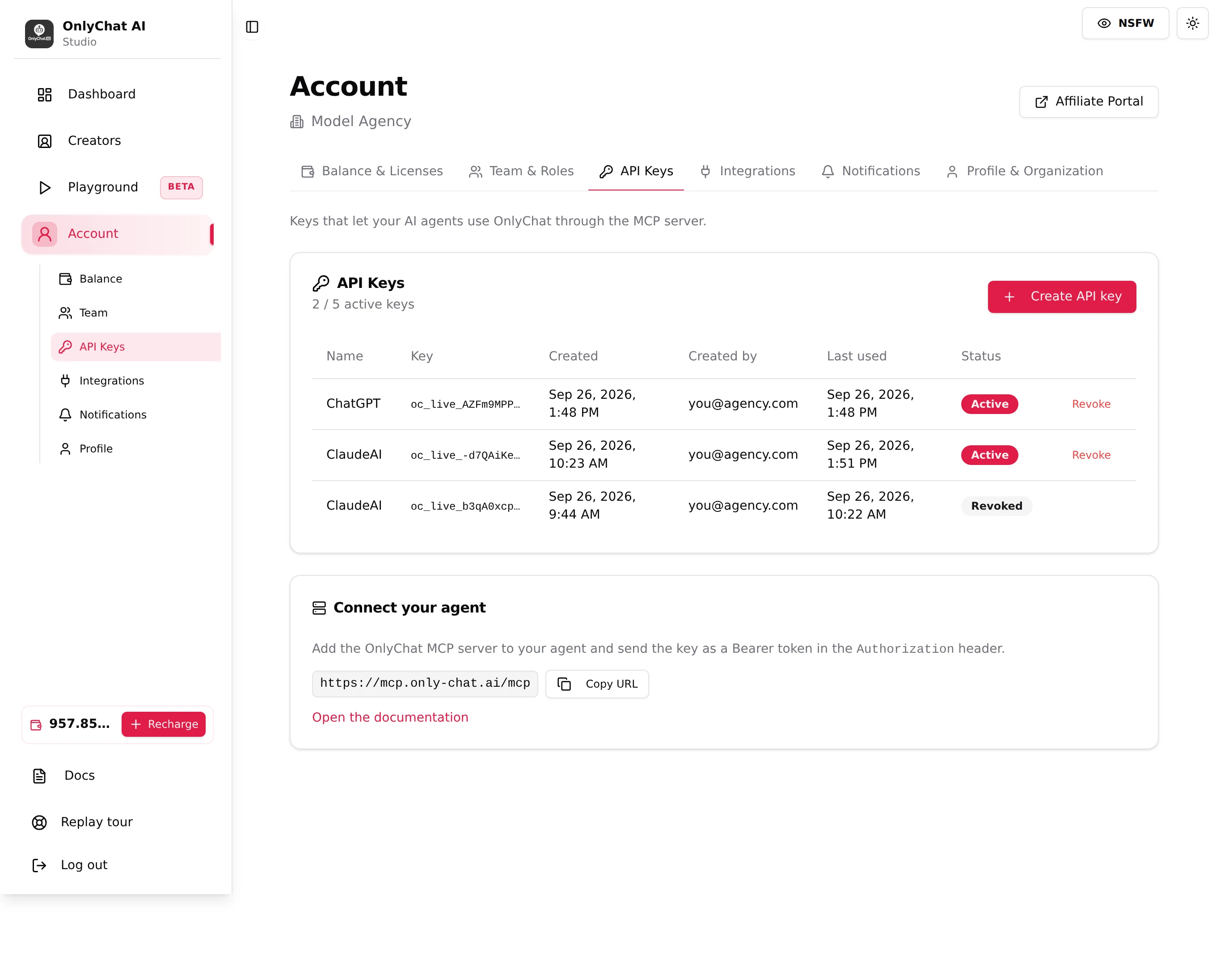
The two things your agent needs
| What | Value |
|---|---|
| Server URL | https://mcp.only-chat.ai/mcp |
| Your API key | Created on the API Keys page, starts with oc_live_, sent as a Bearer token in the Authorization header |
Next steps
- Create your API key: name it, confirm by email, copy it once.
- Connect your agent: the exact steps for Claude, ChatGPT and Codex or Cursor.
- What your agent can read and do: the read and write tools, and the safety rules.
The key carries your whole organization's access, every creator. Treat it like a password: never share it, never paste it in public, and revoke it if it leaks.