Telegram Setup
Enable Secretary Mode and connect your Telegram account to the bot.
This is the final step. You'll enable Secretary Mode on the bot and connect your Telegram account.
1. Enable Secretary Mode on the Bot
Open BotFather from your main Telegram account.
Run:
/mybots
Select your bot → Bot Settings → Secretary Mode → Turn Secretary Mode On
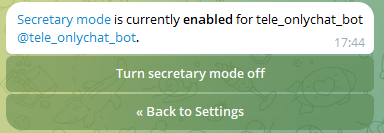
If Secretary Mode is already enabled, no action needed.
2. Get Telegram Premium
The Telegram account that will be connected to the bot must have Telegram Premium.
Telegram Business is included in Telegram Premium.
3. Connect the Bot to Your Telegram Account
On the Telegram account that will be linked to the bot:
- Go to Settings
- Tap Telegram Business
- Tap Chatbots
- Tap Connect your bot
- Search for and select your bot
4. Set Bot Permissions
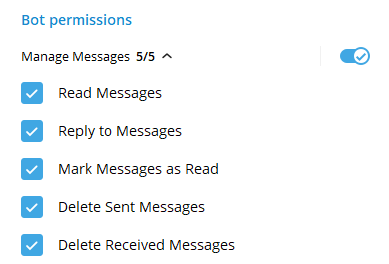
After connecting, you'll see a Bot Permissions section. Enable all five:
| Permission | Required |
|---|---|
| Read Messages | ✅ |
| Reply to Messages | ✅ |
| Mark Messages as Read | ✅ |
| Delete Sent Messages | ✅ |
| Delete Received Messages | ✅ |
All 5 must be enabled — this is Manage Messages: 5/5.
5. Finalize the Connection
Once all permissions are set, go back in Telegram's settings.
This creates (or updates) the Business Connection — OnlyChatAI will automatically detect it and finish configuring the bot.
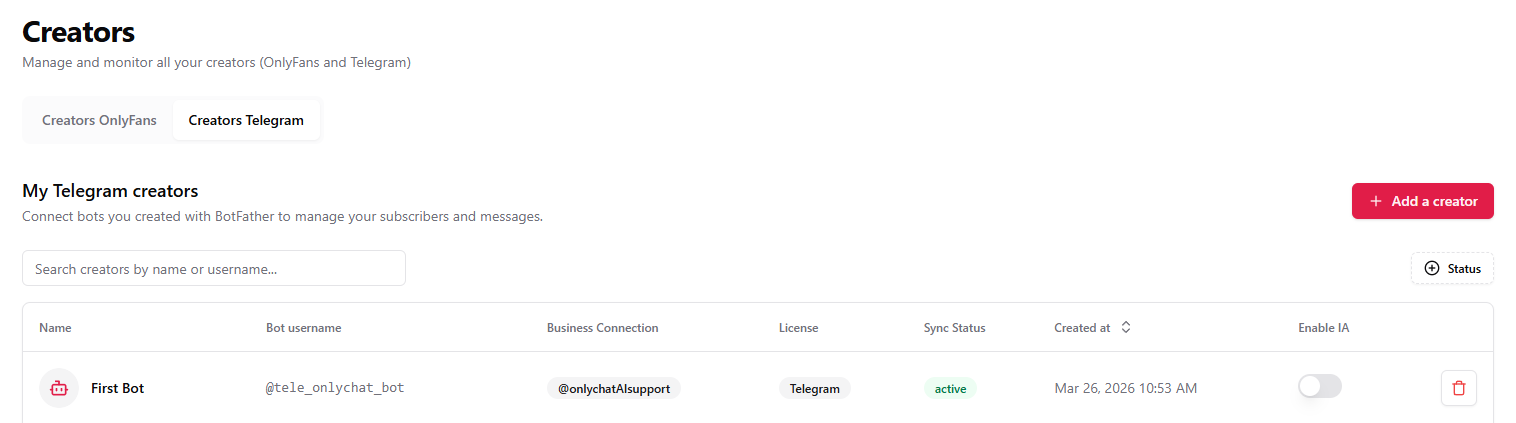
💡 Already connected but something isn't working?
Simply re-open the Bot Permissions, toggle any permission off and back on, then go back. This triggers a new update that OnlyChatAI can pick up.
🎉 Your Telegram AI is now live!
Head to the Telegram Platform to configure Fans, Media, Scripts, and Settings.